March 17, 202621 min read5 sections
Your Ultimate Guide to a B2B Podcast Setup for Two
By Fame Team
Key Takeaways
- A two-host podcast setup is a strategic asset that drives B2B growth through dynamic conversations.
- Two hosts provide more depth and nuance, making the podcast more engaging and easier to digest.
- A well-produced two-host show helps a business cut through the noise and build authority in a crowded market.
A solid podcast setup for two is about way more than just plugging in a couple of microphones. It's about engineering a system where the tech fades into the background. When you get it right, the conversation between your hosts takes center stage, building real authority and driving actual results for your B2B brand.
Why a Two-Host Podcast Drives B2B Growth
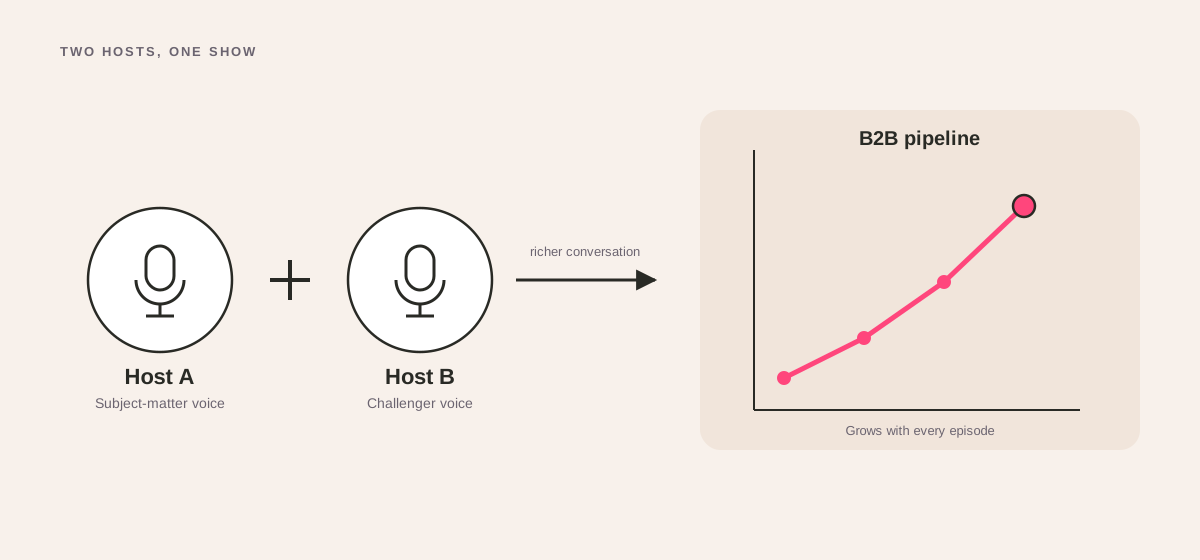
Think of a two-host podcast not just as another piece of content, but as a strategic asset. The real magic is in the dynamic - something a solo show just can't replicate.
When you put two experts in a room, whether it's co-founders, department heads, or a host with a recurring guest, the conversation flows naturally. This back-and-forth makes even the most complicated industry topics feel more engaging and easier to digest.
This format is a powerhouse for any business trying to build deep authority. Picture two marketing VPs from a SaaS company breaking down their playbook for scaling a lead pipeline before their IPO. That's not just a hypothetical; it's happening more and more as podcasting explodes.
People are tuning in, spending an average of 6.3 hours weekly listening to podcasts. With a projected 4.52 million podcasts cluttering the airwaves by 2026, a sharp, well-produced two-host show is how you cut through the noise.
The Strategic Advantage of Two Voices
For a B2B company, putting two hosts behind the mics gives you a few powerful advantages over going it alone.
This dual-expert approach immediately adds more depth and nuance, which is especially potent for:
- Building Thought Leadership: Two hosts can debate, build on each other's points, and create a richer discussion. This showcases your company's collective brainpower, not just one person's opinion.
- Driving Business Milestones: A podcast is an incredible tool for supporting major company goals. Use it to communicate your vision and strategy directly to the market ahead of a big product launch or even an IPO.
- Fostering Authentic Connection: The natural banter between two people who genuinely know their stuff creates an authenticity that builds real trust and loyalty with your audience.
To really make it work, your two-host show needs to be part of a solid content marketing strategy tied directly to business goals. Your podcast should be a core pillar of your plan to attract, engage, and convert your ideal customers. For a step-by-step guide on how to integrate this, see our advice on planning a podcast.
A two-host format inherently creates more dynamic content. It's not just a monologue; it's a conversation. This dialog makes it easier to extract valuable insights and repurpose them across social media and newsletters, maximizing the ROI of every episode.
Ultimately, the goal is to turn your team's expertise into a demand-generation engine. The interplay between two hosts makes for great listening, but the real power is how that engagement turns into tangible business outcomes. By focusing on measurable results, your podcast becomes more than just content - it becomes a cornerstone of your growth strategy. You can get a deeper look at the core benefits of a podcast and how this all translates to business value.
Choosing Your Gear for Any Budget
Let's talk about gear. It’s easy to get lost in a sea of tech specs and fancy equipment, but the truth is, you don’t need a Hollywood studio budget to sound great.
The single most important thing is capturing clean, clear audio for both you and your co-host. Your listeners will forgive grainy video, but they will absolutely abandon your show for bad audio. A solid podcast setup for two is your first, and best, defense against losing an audience.
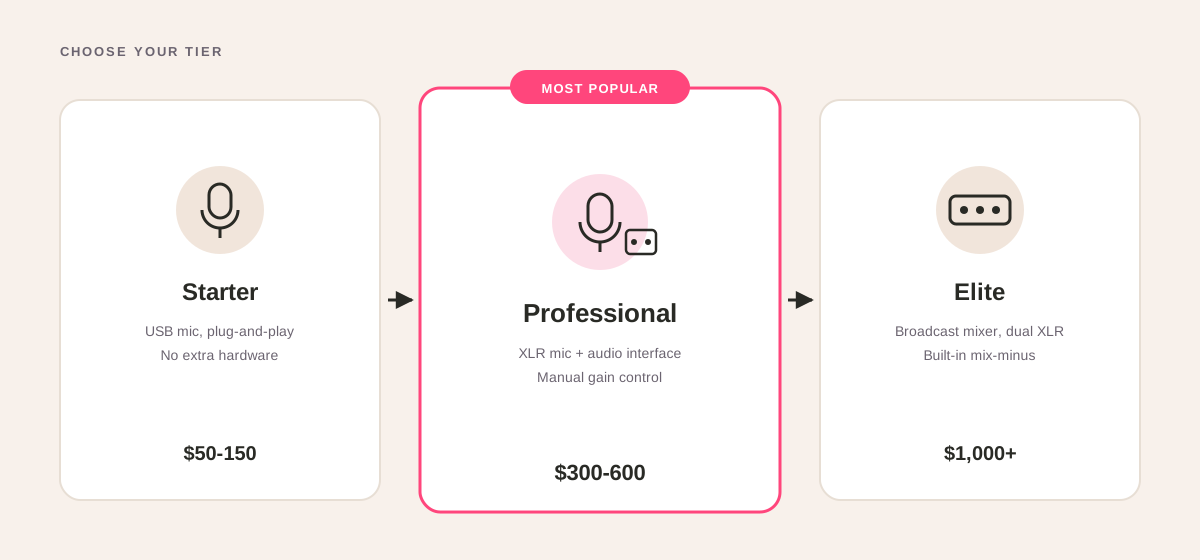
We’ll look at three practical budget tiers. Each one is built around getting the best sound for your money, so you can make a smart call from day one. Find a complete breakdown in our B2B podcast equipment guide.
The Starter Setup: Great Audio on a Budget
If you’re just getting your feet wet, the mission is simple: sound clear and professional without lighting your wallet on fire. You can get surprisingly good quality with just a couple of key items.
This setup is all about USB microphones. They plug straight into your computer, so there are no complicated mixers or interfaces to worry about. It’s plug-and-play.
- Microphones (x2): The Samson Q2U is an absolute workhorse. It’s a dynamic mic, which is a lifesaver for recording in a normal room because it cuts down on background noise. Plus, it has both USB and XLR outputs, giving you a clear upgrade path later.
- Headphones (x2): Honestly, any pair of wired headphones will work. The goal is just to hear yourself and your co-host clearly without any delay or sound bleeding from your computer speakers. Even the simple earbuds that come with a phone will do the trick.
Key Takeaway: You absolutely, positively need two separate microphones. Trying to share one mic is a recipe for disaster - volume levels will be all over the place, and editing becomes a total nightmare. Each host gets their own mic, recorded on a separate track. This is non-negotiable.
The Professional Setup: Upping Your Audio Game
Okay, so you've got a few episodes under your belt and you're ready to invest in that next level of quality. This is where you move from simple USB mics to an XLR-based setup, which gives you far more control and noticeably better sound.
The heart of this setup is a multi-channel audio interface. This little box lets you plug in two (or more) pro-level XLR mics and adjust the gain (that’s the input volume) for each person independently. This is a game-changer for balancing two different voices.
- Microphones (x2): The Rode Procaster or Shure SM58 are industry favorites. They're both dynamic mics that give you that rich, broadcast-style vocal tone while keeping room echo to a minimum.
- Audio Interface: The Focusrite Scarlett 2i2 is the gold standard for a reason. It’s a two-channel interface that gives your mics clean power and lets you record each host onto their own audio track.
- Headphones (x2): Now is a good time to upgrade to some over-ear headphones like the Sony MDR-7506. They offer much better sound isolation, which helps you both stay locked into the conversation.
This level of precision is what separates a hobby from a serious B2B podcast. With the global podcast market expected to hit $131 billion by 2030, listener expectations are climbing. The average weekly listener in the U.S. tunes in for 6.3 hours, and they have no patience for muddy audio.
The Elite Setup: Broadcast-Quality Studio Sound
When your B2B podcast is a flagship piece of your brand, and you want zero compromises on audio quality, you step up to the elite tier. This is the gear you'll find in professional recording studios and high-end broadcast setups. It’s an investment, for sure, but the results speak for themselves.
Here, you’re building a complete audio ecosystem. You’ll be looking at a dedicated mixer or an all-in-one production studio like the RodeCaster Pro II, which has powerful tools like noise gates and compressors built right in to make you sound incredible in real-time.
- Microphones (x2): Look no further than the Shure SM7B or Earthworks ETHOS. These are legends in the broadcast world, delivering a warm, crisp vocal sound that needs very little cleanup in post-production.
- Audio Production Studio: A RODECaster Pro II or RODECaster Duo becomes your command center. It’s a mixer, interface, and recorder rolled into one, packed with processing that makes your voices pop.
- Premium Headphones (x2): Gear like the Beyerdynamic DT 770 PRO offers outstanding detail and comfort, which is crucial for long recording sessions. You'll hear every tiny detail.
To help you compare these options side-by-side, we've put together a simple table breaking down the costs and components for each tier.
Two-Host Podcast Gear Comparison by Budget
| Budget Tier | Microphones (x2) | Audio Interface/Mixer | Headphones (x2) | Estimated Cost |
|---|---|---|---|---|
| Starter | Samson Q2U | N/A (USB Mics) | Any wired earbuds | $140 - $200 |
| Professional | Rode Procaster / Shure SM58 | Focusrite Scarlett 2i2 | Sony MDR-7506 | $650 - $800 |
| Elite | Shure SM7B / Earthworks ETHOS | RodeCaster Pro II / Duo | Beyerdynamic DT 770 PRO | $1,500 - $2,000+ |
Ultimately, no matter which budget you’re working with, the best equipment is the gear that you can rely on to work every single time.
And if you want to go even deeper down the rabbit hole, you can explore our complete guide to podcast setup equipment for more recommendations.
Mastering In-Person vs. Remote Recording
When you’re planning a podcast setup for two, one of the first big decisions you'll face is whether to record in the same room or from different locations. It’s a major fork in the road. Both ways have their own feel and workflow, and the right choice really boils down to your goals, your guests, and what resources you have on hand.
While the classic image of two hosts chatting across a table has its charm, the strategic power of remote recording is impossible to overlook, especially in the B2B world. It completely removes geography from the equation.
The Case for Remote Recording
Let's be clear: remote recording isn't just a backup plan. It’s a massive strategic advantage. If your B2B podcast is trying to land interviews with busy executives or sought-after industry experts, going remote is a non-negotiable. The sheer convenience makes it so much easier to get a "yes" from someone whose calendar is packed.
Just think about the practical wins:
- Access to Top-Tier Guests: You can interview literally anyone, anywhere on the planet, without asking them to block out a day for travel.
- Zero Travel Costs: Forget about budgeting for flights, hotels, or Ubers. That money can go right back into improving or promoting your show.
- No Studio Fees: Renting professional studio space adds up quickly. Recording remotely wipes that recurring expense off the books entirely.
This level of accessibility is exactly why so many B2B brands are going all-in on the remote format. Podcasting is only getting bigger, with a projected 619 million listeners globally by 2026. Making it dead simple for guests to join you is how you create standout content. You can explore more about these global podcasting market trends on podcastvideos.com.
Of course, the big fear is always audio quality. But that’s a problem you can absolutely solve.
Our Founder's Take: "Great audio is more important than great video," says Fame's founder, Tom Hunt. "People will tolerate lower-quality video, but jarring, low-quality audio will make them tune out instantly."
Here’s an actionable checklist to make sure your remote audio sounds crisp and professional:
- Mandate Wired Headphones: Insist that your co-host and every guest use wired headphones - not Bluetooth. This one simple rule stops audio lag and kills the echo you get when their microphone picks up sound from their computer speakers.
- Guide Their Setup: A quick prep email goes a long way. Advise them to find a quiet room, preferably with carpet or furniture to absorb sound. For video, tell them to sit facing a window for great, natural light.
- Send a Guest Kit: If you have the budget, mailing an affordable USB mic like a Blue Yeti is a brilliant move. It guarantees you get good audio from their end and shows your guest you're serious about quality. For more on this, check our guide on how to prepare for a podcast guest appearance.
Mastering remote recording for your podcast hinges on a stable connection, and choosing the best internet for remote work is just as critical for clear audio as it is for any other remote task.
Perfecting In-Person Recording
If you and your co-host live in the same city, recording together in person can create an amazing energy. The natural back-and-forth is tough to replicate remotely. But it also brings a new technical problem to the table: crosstalk.
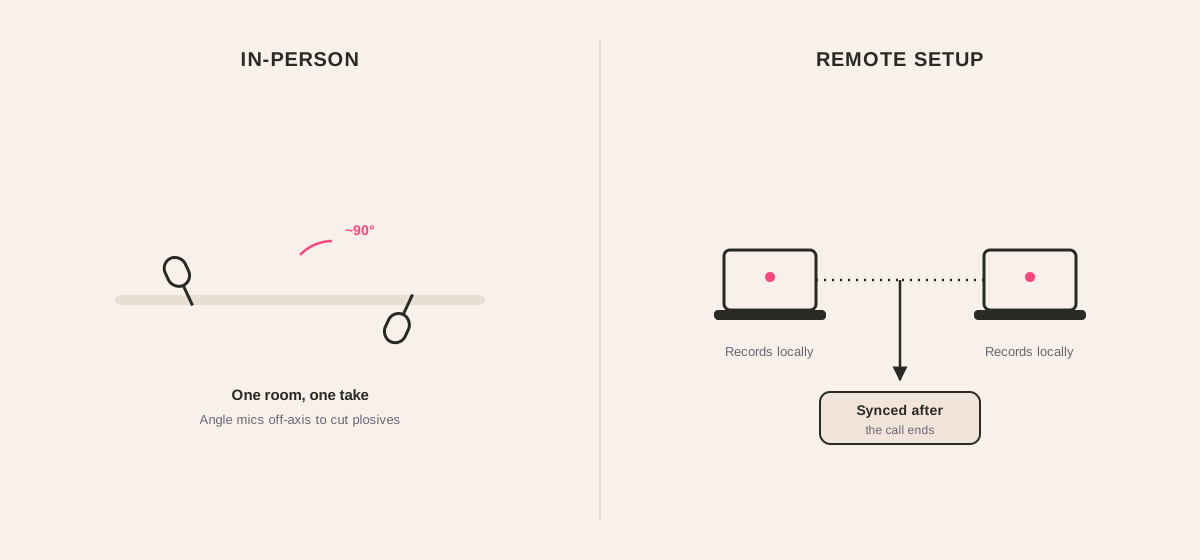
Crosstalk, or microphone bleed, is what happens when your mic picks up your co-host’s voice and their mic picks up yours. It creates a thin, hollow, slightly echoey sound that is a nightmare to fix in editing.
The fix is all about smart mic choice and placement.
- Use Directional Microphones: Cardioid and supercardioid mics (like the Samson Q2U or Shure SM58) are your best friends here. They're designed to pick up sound from directly in front of them while rejecting sound from the sides and back.
- The 90-Degree Rule: Arrange the two microphones so they form a 90-degree angle. Each host should speak directly into their own mic. This setup points the "deaf" part of each microphone directly at the other person's mouth, dramatically cutting down on bleed.
Enhancing Your Video Production
Whether you're in-person or remote, adding some visual flair can make your video podcast so much more watchable on platforms like YouTube. Don't just settle for one boring, static webcam shot.
A simple trick used by major broadcasters like the BBC is to use multiple camera angles, even for remote interviews. You can easily do this yourself. Just set up a second camera - your smartphone on a small tripod works perfectly - to capture a side profile of you at your desk.
When you're editing, you can cut between your main front-facing shot and this alternate angle. It instantly makes the production feel more dynamic and professional, almost like a mini-documentary, and keeps your viewers much more engaged. To take your video presence further, see our advice on how to start a podcast on YouTube.
Ultimately, knowing how to handle both remote and in-person sessions gives you the flexibility to produce a great-sounding show, no matter what. For a deeper look, check out our complete guide on how to master remote podcast recording.
Alright, let's talk about the other half of the equation: your software. All the best gear in the world won't save you if your recording and editing software isn't up to the task. This is where you actually turn two separate voices into a single, polished episode.
The single most important rule here is multi-track recording. I can't stress this enough. Each host's microphone must record onto its own separate track. This is the only way you’ll have the flexibility to edit each voice independently later on. Without it, you’re stuck with one combined audio file, and if one person is too loud or coughs over the other, there’s absolutely nothing you can do about it.
Choosing Your Recording Software
To get the job done, you'll need what's called a Digital Audio Workstation, or DAW. This is just a fancy term for software built to handle audio. There are a ton of options out there, but they mostly break down into two camps.
- Audacity: The go-to free, open-source editor for a reason. It's a fantastic starting point that fully supports multi-track recording and gives you all the basic tools you’ll need to clean up your audio without spending a dime.
- Adobe Audition: If you're already in the Adobe ecosystem or want to go pro from day one, Audition is a beast. It's packed with incredibly powerful features, especially its noise reduction tools, which can be a lifesaver. It’s a top choice for podcasters serious about sound quality.
Whichever you land on, the core process is the same. You'll start a new multi-track session, tell the software which microphone goes to which track, arm them for recording, and you're off.
Remote Recording Platforms The Smart Way
When you and your co-host aren't in the same room, things get tricky. You might be tempted to just use Zoom or Google Meet, but you’re essentially gambling your audio quality on the whims of your internet connection. One little glitch and your recording is toast.
This is where dedicated remote recording platforms are a game-changer.
Platforms like Riverside.fm or SquadCast have a clever solution: they record each person’s audio and video locally on their own computer. This means that even if the call stutters or drops, the final files are crystal-clear and high-resolution. Once the session ends, the platform uploads those pristine local recordings for you. If you want to see what else is out there, you can explore some of the best podcast recording apps on the market.
Using a dedicated remote recording platform is one of the single best investments you can make for a two-person podcast. It eliminates the biggest variable - internet stability - and ensures you get studio-quality audio from anyone, anywhere in the world.
Your Pre-Flight Technical Checklist
Before you hit that big red button, run through this quick pre-flight check. It takes less than five minutes but will save you from a world of pain in post-production. Make this a habit.
- Check Your Input Levels: Get both hosts talking at a normal volume. Look at the audio meters in your software. You want the levels bouncing around in the green and yellow. A little flicker into the orange is fine, but you should never hit the red. Red means the audio is "clipping," and that creates a nasty distortion you can't fix.
- Conduct a Soundcheck: Record a quick 30-second test with both of you talking. Now, listen back with headphones. Are both voices clear? Can you hear a humming A/C unit or an echo? This is your last chance to catch problems before you're an hour into a recording.
- Enable Local Backups: If your software offers it, turn on local backups. Always. Think of it as a safety net. If your primary recording gets corrupted or the cloud upload fails, you still have a usable copy saved right on your hard drive.
Turning this checklist into a non-negotiable ritual makes the tech setup a simple, repeatable process instead of a source of stress. It lets you and your co-host stop worrying about the gear and start focusing on what really matters: the conversation.
Your Post-Production and Marketing Playbook
That feeling when you hit the 'stop' button on your recording software is fantastic. But it's not the end - it’s the halfway point. What you do next, in post-production and promotion, is what turns that raw conversation into an actual business asset.
This is the critical handoff from your technical podcast setup for two to the real goal: generating demand and building a name for yourself.
Editing a two-host show has its own quirks. Your entire job is to make the listening experience seamless. You want both voices to be perfectly clear, balanced, and easy to follow. A truly great edit is one your audience never even notices.
This workflow is deceptively simple, but getting each part right is what separates the pros from the amateurs.
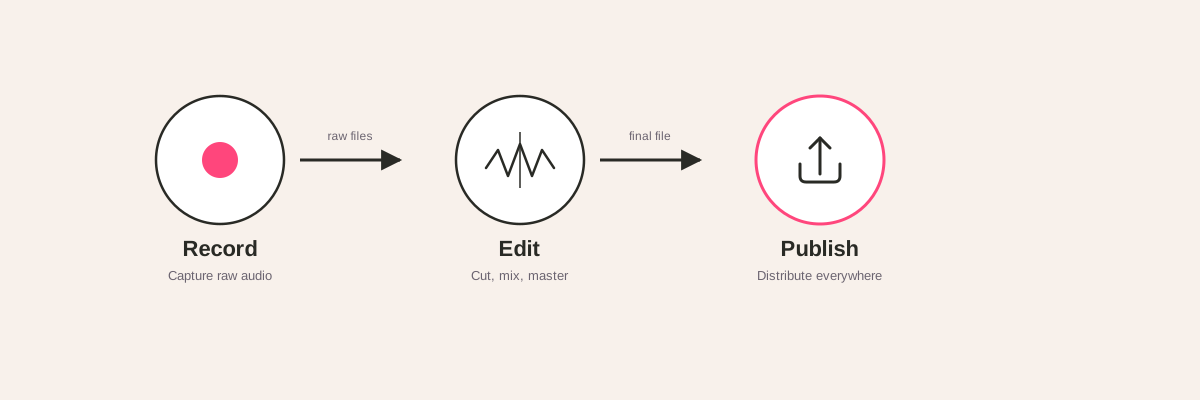
Each stage - recording, editing, and publishing - is a building block. A weakness in one will compromise the whole structure. For a detailed breakdown, follow our podcast production workflow.
The Two-Host Editing Checklist
Remember how you recorded each host on a separate track? This is where that little bit of extra work pays off in a big way, giving you total control in the edit.
Here's a no-fluff checklist to run through.
- Audio Leveling: This is non-negotiable. People speak at different volumes. Use your software to level both hosts so they’re at an equal, consistent volume. Your listeners shouldn't have to touch their volume dial.
- Crosstalk Cleanup: It happens. No matter how good your mic discipline is, you'll talk over each other. With separate tracks, you can just "duck" (or lower) the volume of the person who isn't meant to be speaking, making the dialogue crisp and clean.
- Remove Distractions: Go through with a fine-tooth comb. Cut out the awkward silences, the "ums" and "ahs," and any background noise that slipped through - a cough, a chair squeak, a distant siren.
- Add Intro & Outro: Slap your professional intro and outro music on the beginning and end. This is the sonic packaging that tells your audience you mean business and that this is a quality B2B show.
If this feels like a chore, it's because it can be. For many, outsourcing this makes sense. A team that specializes in B2B podcast production services can take this entire process off your plate, letting you just focus on the conversation.
Turning Episodes into Marketing Assets
A brilliant podcast that nobody hears is just a very well-produced audio file on your hard drive. Your marketing engine needs to fire up the second your episode is ready. The entire point is to get your show in front of your ideal customer.
The most efficient way to do this is by repurposing everything. That one-hour recording is a content goldmine.
Find the most impactful 1-2 minute clips, burn captions onto them, and blast them out on platforms like LinkedIn. These short, punchy videos are perfect for snagging attention in a busy feed and teasing the full episode.
"A common mistake is thinking your job is done once you hit publish. For a B2B podcast, promotion is everything. You need to actively push your content out through channels where your ideal customers already are." - Tom Hunt, Founder of Fame
Building a direct channel to your listeners is also huge. An email newsletter is your best friend here. Don't just dump a link to the new episode. Write a short summary, pull out the key takeaways, and tell your subscribers why they need to listen to this one. This is how you build a loyal base that actually looks forward to your next drop.
At Fame, we bake this all into our standard process. Our dedicated B2B social media agency and B2B email newsletter agency teams live and breathe this stuff. They're experts at turning podcast content into a growth engine, making sure your message isn't just recorded - it's heard by the right people.
Your Two-Host Podcast Questions, Answered
Even with the perfect playbook, you’re going to run into some specific snags when setting up your two-person podcast. This is where we’ll tackle the most common questions we hear from B2B brands. Think of it as your quick-fire troubleshooting guide to get you past those little hurdles and back to hitting record.
Do We Really Need Two Mics?
One hundred percent, yes. It might be tempting to share a single microphone to cut costs, but it’s the quickest route to an amateur-sounding show. When two people are fighting for space on one mic, their volume levels will be all over the place. The result is a distracting, jarring listening experience that screams unprofessional.
Each host needs their own dedicated microphone, period. This ensures you capture their voice cleanly on a separate audio track. It's the only way to get total control in the edit, letting you balance the levels so both hosts sound equally clear and present. Honestly, it’s the single most important investment you can make in your sound.
How Do We Stop Talking Over Each Other?
This is a classic two-host problem you solve with a bit of technique and a bit of tech. On the technique side, a solid show outline is your best friend. When both of you know the conversational flow and whose turn it is to take the lead, you'll naturally interrupt each other less. Visual cues are also massive, especially on video - a simple hand gesture is all you need to signal you want to jump in.
The technical side is your safety net. Recording each person on a separate audio track lets your editor “duck” the non-speaking host’s audio, cleaning up any accidental crosstalk. This one simple editing move makes the final conversation feel so much more polished and easy to follow.
Key Insight: Mastering the two-person conversation is about more than just not interrupting. It's about active listening. Your goal is to build on what your co-host is saying, not just wait for your turn to talk. This is what creates a truly dynamic and engaging discussion.
Can We Just Start With Our Phones?
Technically, you can. But for a B2B podcast where your brand’s authority is on the line, it's a terrible idea. Your phone's built-in mic isn’t made for high-quality voice recording. It will pick up every echo, every bit of room noise, and leave you with audio that sounds thin and harsh.
Listeners have a very low tolerance for bad sound. A modest investment in two entry-level USB mics and a couple of pairs of wired headphones will elevate your sound quality from zero to hero. It immediately signals to your audience that you respect their time and are serious about what you’re doing. For more pointers, see our advice for starting a podcast.
How Do We Make Remote Recordings Sound Pro?
The secret here is a combination of the right software and controlling each person's recording environment. It's simpler than you think.
- Use a Dedicated Platform: Tools like Riverside.fm or SquadCast are non-negotiable. They record each person’s audio and video locally on their own computer, so a spotty internet connection won't trash your high-quality files.
- Mandate Mics & Headphones: Both hosts (and any guests) absolutely must use an external microphone and wear wired headphones. This is the only way to prevent echo and feedback from ruining your recording.
- Control the Environment: Ask each person to record in a quiet, furnished room. Things like carpets, curtains, bookshelves, and even a bed are great for absorbing sound and killing that dreaded echo.
Follow these simple rules, and your remote recording can sound just as good as an in-person studio session. A well-structured conversation is also key, and you can find some great advice on crafting good podcast questions that will help guide your remote chats.
Ready to turn your B2B expertise into a demand-generation machine? At Fame, we help B2B brands launch and scale podcasts that build authority and drive real business results. Stop worrying about the gear and let us handle the entire production process.
Want us to run this for you?
Fame starts and grows B2B podcasts that generate pipeline. Tell us who you are trying to reach and we will send a costed proposal within 48 hours.
Related content
- Read moreFame Team · July 16, 2026
10 Account Based Marketing Tactics For B2B Growth In 2026
Discover 10 actionable account based marketing tactics for B2B tech. Learn to use podcasts, data, and targeted content to close high-value accounts. - Read moreFame Team · July 16, 2026
The 8 Best Brighton Podcast Agency Picks For 2026
Find the best Brighton podcast agency for your B2B brand. Our 2026 guide reviews top 8 agencies for production, growth & ROI. Expert analysis here - Read moreJune 10, 2026
20 Best Podcast Production Agencies For 2026 (And Why Should You Hire One)
Global podcast and vodcast ad revenues are on track to hit $5 billion in 2026 , up 20% year-on-year. - Read moreApril 13, 2026
Leadership In Marketing: The B2B Podcast Playbook
Most companies still confuse leadership in marketing with job titles, org charts, and budget control. That's outdated.