

The "best" podcast setup isn't a specific microphone or fancy mixing board. It's the unique combination of gear, software, and workflows that helps you achieve your business goals. A setup designed to establish your CEO as a thought leader with high-profile guests will look completely different from one built for a scrappy, internal training podcast.
Your goals must drive your gear decisions, not the other way around.
Matching Your Podcast Setup To Your Business Goals
Before adding a single item to your Amazon cart, you must get crystal clear on what success looks like for your show. Are you trying to generate qualified leads? Establish your founder as an industry icon? Or simply add a powerful new channel to your content marketing?
Each of these goals points to a different style of podcast, which in turn demands a specific kind of setup.
This is the most overlooked step in building a B2B podcast. Without a clear "why," teams either overspend on complicated gear they'll never use or underspend on critical pieces, torpedoing their audio quality and making their brand sound amateur.
First, Define Your Podcast's Purpose
Think of your podcast setup like a carpenter’s toolkit. You wouldn't use a delicate hand saw to rip through a 2x4, and you wouldn't use a chainsaw for fine woodworking. The tool has to match the job. Podcasting is no different.
You need to build a framework that connects your marketing objectives directly to your production style. Let's make this actionable:
- To Generate Leads: If you're running a show with customer success stories or expert interviews, build a setup that makes remote recording flawless for your guests. The priority is making them sound amazing with minimal hassle.
- To Build Thought Leadership: For a solo or co-hosted show where your internal experts are the stars, you must achieve pristine in-house audio quality. Focus your setup on clarity and professionalism to perfectly reflect your brand’s authority.
- To Increase Brand Awareness: For an engaging, narrative-style podcast, you may need a hybrid setup. This setup should handle both polished in-studio sessions and high-quality interviews recorded on the road, demanding versatility above all else.
This "goals-first" approach ensures every dollar you invest is tied to a specific business purpose. Formalize this by creating a business plan for your podcast to lock in your objectives and KPIs from day one.
To make this even clearer, use this table to align your business goals with the right setup philosophy.
Podcast Setup Framework Based on Business Goals
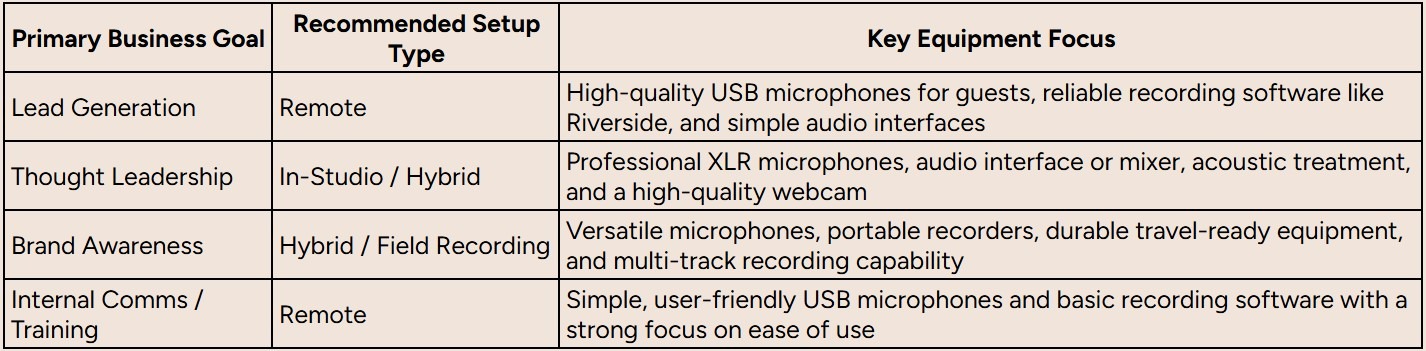
This framework isn't about specific brands but about prioritizing where to direct your budget and attention based on what you're trying to achieve.
Why Quality Matters More Than Ever
Investing in the right setup has never been more critical. The podcasting market is exploding, projected to hit $131.13 billion by 2030. With that growth comes higher listener expectations. Good audio is no longer a "nice to have"; it's a requirement. Your production value is one of the clearest ways to stand out in a crowded field.
The ideal setup isn’t about having the most expensive equipment. It’s about having the right equipment to consistently and efficiently produce content that achieves your specific business outcomes.
Building Your Core Audio Chain for Professional Sound
To get that crisp, professional sound, you need to understand how all your audio tools work together, not just focus on one magic microphone.
Think of it as a sound kitchen. Every piece of gear is a station that prepares your voice, the raw ingredient, for the final, polished dish your audience enjoys. The connected path your voice travels is called the audio chain.
This chain has four key links: the microphone, the audio interface, your headphones, and your recording software. Just like in a real kitchen, a single weak link can ruin the entire meal. A great microphone can't save a recording if technical glitches occur further down the line.
Understanding this flow is the first step to building a podcast setup that works for you. It removes the mystery from the technology and helps you make smarter, goal-driven decisions about your equipment.
The Microphone: Capturing Your Voice
The microphone is where it all begins. It is the most critical link in your audio chain because it converts your spoken words into an electrical signal. This single component has the biggest impact on your raw audio quality.
The market data confirms this. The global podcasting hardware market, worth around USD 3.6 billion, is expected to grow to USD 28.07 billion by 2034. Microphones make up the largest piece of that pie, with a 24.2% share, showing how essential they are for creating clear, engaging audio.
For podcasting, choose between the two main types:
- USB Microphones: These are plug-and-play. They connect directly to your computer and are perfect for solo hosts or beginners. They combine the microphone and audio interface into one simple device.
- XLR Microphones: This is the professional standard. XLR mics require a separate audio interface to connect to your computer, but they offer greater flexibility and often better sound quality. Choose this option for studio-grade audio, especially with multiple hosts or guests.
The Audio Interface: Translating the Signal
If an XLR microphone is your professional chef's knife, the audio interface is the cutting board and prep station. This box acts as the bridge between your high-quality mic and your computer. It takes the analog signal from the XLR cable and converts it into a digital format that your computer can record.
A good audio interface also gives you critical control. It has built-in preamps that boost the microphone's signal to a usable level and allow you to set your recording volume precisely, a process known as gain staging. Nailing your gain staging prevents the two most common audio issues: recordings that are too quiet and full of hiss, or so loud they're distorted and unusable.
A dedicated audio interface is a key element that separates an amateur-sounding podcast from a professional one. It provides the control, quality, and reliability needed for consistently great audio.
Headphones and Software: Monitoring and Capturing
The last two links in the chain are your headphones and recording software. They work together to help you monitor your sound in real-time and capture the final performance.
Headphones are your quality control. They let you hear exactly what the microphone is picking up while you're recording, not what you think you sound like in the room. This is called monitoring, and it's how you catch problems like a humming air conditioner, plosives (harsh popping "p" sounds), or bad mic placement before they ruin a take. Actionable Tip: Always use wired headphones to avoid the audio delay common with Bluetooth.
Recording Software, or a Digital Audio Workstation (DAW), is where everything comes together. This software captures the digital signal from your interface and saves it as an audio file. Your DAW is your recording studio, editing suite, and mixing board all in one.
For a deeper look into specific equipment recommendations, check out our complete guide to podcast studio equipment.
Choosing the Right Podcasting Gear for Your Budget
Now that you understand the audio chain, it’s time to put it into practice. Choosing the best podcast setup for your business means balancing your goals, desired quality, and budget.
You don't need to spend thousands of dollars to sound professional. But you do need to know where your money makes the biggest difference. To keep it simple, here are three practical tiers for B2B podcasters. Each offers a significant jump in quality as you move up.
First, let's review the audio chain. This is the fundamental path your voice travels, from the microphone to your recording software.
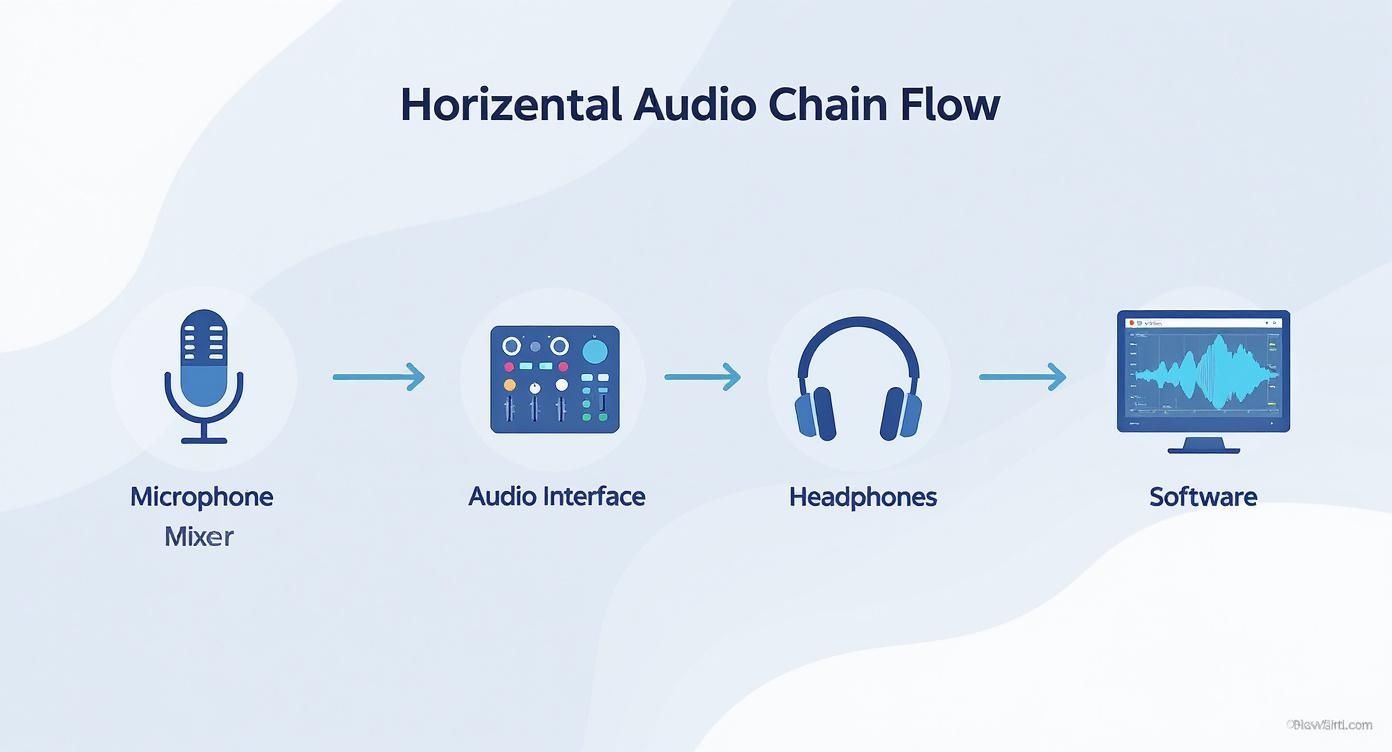
Understanding this flow is crucial. It’s how you’ll troubleshoot problems and make smart decisions about what to upgrade next, regardless of your budget.
The Starter Setup: Under $300
This tier is about getting great sound with minimal fuss and a small investment. It’s the perfect launchpad for solo shows, internal company podcasts, or testing the podcasting waters without a big financial commitment.
The key here is simplicity. Focus on a high-quality USB microphone that gives you fantastic results right out of the box.
- Microphone: The Samson Q2U (around $70) is a legend for a reason. It's a dynamic mic, which is great at ignoring background noise, perfect for a home office without acoustic treatment. It has both USB and XLR outputs, providing a built-in upgrade path for when you're ready for an audio interface.
- Headphones: Any decent pair of wired headphones will work. The classic Apple EarPods or the Sony MDR-ZX110 are inexpensive, reliable options for monitoring your audio without the delay from Bluetooth.
Don't assume a small budget means low quality. A well-used Samson Q2U in a quiet room will always sound better than an expensive mic used poorly in a noisy, echoey space.
The Professional Setup: $300 to $1,000
This is the sweet spot for most B2B podcasts. If you're conducting interviews, co-hosting a show, or producing thought leadership content, this setup provides consistently crisp, professional audio.
Moving into this price range unlocks the power of an XLR-based setup. You get more control, more flexibility, and a noticeable leap in sound quality.
- Microphone: The Rode PodMic (around $100) or the Shure MV7+ (around $395) are industry workhorses. They are built for the spoken word, delivering a rich, broadcast-style vocal tone that makes you sound instantly more authoritative.
- Audio Interface: The Focusrite Scarlett 2i2 (around $280) is one of the most popular interfaces for podcasters. It provides two clean, powerful inputs for your XLR mics, has simple controls, and is built to last.
- Headphones: At this level, get the Audio-Technica ATH-M20x (around $65). They provide excellent sound isolation and accurate playback, helping you catch small audio issues like plosives or background hum during recording.
If you want to go deeper on specific gear, check out our comprehensive guide on the equipment needed for a podcast.
The Studio-Grade Setup: Over $1,000
When your podcast becomes a core part of your marketing engine and audio quality is non-negotiable, it's time to invest in a studio-grade setup. This tier is for achieving pristine, flawless sound that your audience would expect from a top media brand.
Here, you’re investing in premium gear that delivers superior clarity, powerful features, and a smoother workflow, especially for shows with multiple people.
- Microphone: The Shure SM7B (around $400) is the undisputed king of podcasting mics. It's used on countless top-charting shows for its incredibly smooth, warm vocal sound and its ability to reject room noise.
- Audio Interface/Mixer: The RODECaster Pro II or RODECaster Duo (around $500–$700) are more than just interfaces — they’re all-in-one production studios. They have multiple mic inputs, built-in processing like noise gates and compressors, and sound pads for adding music and effects on the fly, which can save significant time in post-production.
- Headphones: The Beyerdynamic DT 770 PRO (around $160) are a studio staple. They’re comfortable for long recording sessions and provide incredibly detailed sound so you can hear everything.
Podcast Equipment Recommendations by Budget
Use this table as your cheat sheet for building a reliable, high-quality B2B podcast setup.
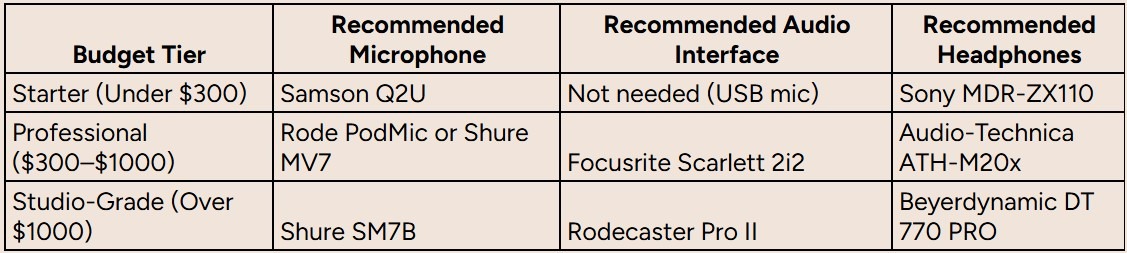
The "best" setup is the one that aligns with your show's goals and allows you to produce great content consistently. Start where you're comfortable and upgrade components as your show grows.
Mastering Your Recording and Production Workflow
Having the right gear is a huge first step, but even the best podcast setup is useless without a solid process. A slick workflow turns your raw audio files into polished, professional episodes consistently.
It's the bridge between your high-quality equipment and the final product your audience hears.
Think of it like having a professional kitchen. The expensive knives and ovens are great, but the magic happens in the mise en place, the organized sequence of prep and cooking that ensures every dish is perfect. Your recording and production workflow is your podcast’s mise en place.
This doesn't need to be complicated. A few deliberate steps during recording and a clear checklist for post-production can save you hours and significantly improve your sound quality.
Nailing The Live Recording
The easiest way to simplify post-production is to capture the best possible audio from the start. Getting it right at the source means less time fixing mistakes later.
Your main goal is to create a clean, consistent recording environment. This boils down to three key actions:
- Perfect Your Mic Technique: Maintain a consistent distance from your microphone; about 4-6 inches is ideal. Speaking directly into the mic produces a clear, bright sound, while speaking at a slight angle can create a richer tone. The key is consistency to avoid fluctuating volume.
- Set Your Gain Levels Correctly: This is critical. Gain staging is setting your mic’s input level on your audio interface. You want the signal strong enough to be clear but not so loud that it “clips” or distorts. Actionable Tip: Aim for your audio levels to consistently peak around 12dB in your recording software.
- Optimize Your Recording Space: You don’t need a professional studio. Record in a room with soft surfaces like carpets, curtains, or a couch. These materials absorb sound reflections and reduce echo, giving you a cleaner sound without spending money on acoustic treatment.
Your Step-by-Step Post-Production Checklist
Once you have your raw audio, it’s time for post-production. Here, you assemble the episode, clean up rough spots, and prepare the final file. A systematic approach is crucial.
The podcast equipment market, valued at USD 3.7 billion in 2025, is projected to hit USD 7.2 billion by 2033, largely due to innovations in recording software that simplify complex editing.
Follow this standard editing sequence for consistent results:
- Content Editing: First, listen through the entire recording. Cut out major mistakes, awkward pauses, and anything that doesn't serve the episode. This pass is about shaping the narrative and ensuring a smooth flow.
- Noise Reduction and Cleanup: Next, use your software’s tools to reduce consistent background noise, like a computer fan or an AC unit. Use these tools sparingly; being too aggressive can make the audio sound robotic and artificial.
- Mixing and Mastering: Balance the audio levels between different speakers, add your intro and outro music, and apply final mastering touches. Mastering ensures your episode has a consistent loudness that meets industry standards, so listeners aren't constantly adjusting the volume.
A well-defined workflow transforms podcasting from a chaotic creative process into a repeatable, scalable system. This is the secret to producing consistently high-quality content.
Modern AI-powered editing tools can now automate many of these steps. To make your show more accessible and repurpose content, integrating efficient video transcription services is another smart move in post-production.
For a much deeper dive, check out our complete podcast production workflow guide.
Getting Flawless Guest Audio From Remote Recordings

In B2B podcasting, your guests are crucial. They are industry experts and the reason your ideal customers tune in. Their insights are valuable, but poor audio quality instantly undermines their authority and makes your brand look unprofessional.
Nailing the remote recording process is a non-negotiable part of the best podcast setup.
This is about more than sending a calendar invite. It’s about designing a smooth, professional guest experience that guarantees they sound incredible with minimal effort on their part. The goal is to make the technology invisible so the conversation can flow naturally.
Get this right, and you'll boost your reputation, encourage guests to share the episode, and ensure the best possible audio every time.
The Secret is Pre-Interview Prep
The single best thing you can do for guest audio happens long before you hit record. Ambushing a guest with technical demands minutes before going live creates stress and results in poor audio. You must be proactive.
Start with clear communication. Send a confirmation email that outlines everything they need to know, from talking points to simple steps for sounding professional.
The guest's experience is just as important as the listener's. A smooth, professional recording process makes your guest feel valued and respected, leading to a more relaxed and insightful conversation.
To make it foolproof, create a "guest kit" to send beforehand. This can be a simple email or a physical package.
- A Recommended USB Microphone: For A-list guests, consider shipping them a simple but high-quality USB mic like the Samson Q2U. It’s a small investment that provides a massive improvement over their laptop mic.
- Wired Headphones: Politely ask them to use any pair of wired headphones. This simple step eliminates audio feedback and avoids the delays caused by Bluetooth devices.
- A Simple Checklist: Create a one-page PDF with easy tips: find a quiet room, close the windows, and silence notifications on their phone and computer.
Choosing the Right Tool for the Job
Your recording software is the other critical piece. Standard meeting tools like Zoom are built for conversation, not content creation. They compress audio aggressively, which can make even a great mic sound thin and tinny.
For the best quality, use a platform built for podcasting.
Tools like Riverside.fm and Zencastr are game-changers. Instead of recording the compressed audio streamed over the internet, these platforms record each person’s audio locally on their own computer in high fidelity. Afterward, the clean, uncompressed audio tracks are uploaded to the cloud.
This approach provides three major benefits:
- Studio-Quality Audio: You capture pristine, high-resolution sound from everyone, unaffected by internet lag.
- Separate Tracks: You get an individual audio file for the host and each guest, giving your editor total control to balance levels, cut noise, and fix mistakes in post-production.
- Video Recording: Most of these platforms also capture high-quality local video, which is perfect for creating promotional clips for social media.
We have a full breakdown of platforms and best practices in our guide on how to record a podcast remotely. A solid recording platform is the cornerstone of any modern, professional podcast setup.
Scaling Your Setup for Promotion and Growth
A great microphone and slick audio interface are only the price of entry. To turn your show from an audio file into a marketing engine that grows your business, you need a scalable system for promotion and measurement.
This is the operational side of your setup, the part that ensures your hard work reaches the right people and delivers measurable results.
First, you need to get your podcast out into the world. Start by choosing a reliable podcast hosting provider. A host is a specialized warehouse for your audio files; it stores them and generates the RSS feed that connects your show to all major listening platforms.
Once an episode is uploaded, submit that RSS feed to all the big podcast directories. This is a one-time setup that makes your show discoverable everywhere.
- Apple Podcasts: A heavyweight with 32.5% of all podcast downloads. Being listed here is non-negotiable.
- Spotify: The biggest player with 34.4% of downloads. It's equally critical for reaching a massive audience.
- Other Key Directories: Don't stop there. Submit to Amazon Music, TuneIn, and others to maximize your show's reach.
Actionable Promotion and Repurposing
With your podcast live, the real work begins. Hitting "publish" and hoping for the best is a recipe for failure. You need an active strategy to build listenership and prove the value of your setup.
Your promotion plan should be a multi-channel effort designed to meet your audience where they are. The most efficient way to do this is by repurposing your core episode into multiple formats.
Your podcast isn't a single piece of content. It's the raw material for an entire campaign's worth of marketing assets, from social clips and articles to lead magnets and email newsletters.
A single 30-minute interview can be repurposed into:
- Social Media Audiograms: Create short, punchy video clips with animated waveforms and a powerful quote to stop the scroll.
- In-Depth Blog Posts: Write a full article that breaks down the episode's key takeaways, optimized for SEO to attract new listeners through search.
- Guest Promotion Kits: Prepare a package of links, graphics, and suggested copy that makes it easy for your guests to share the episode with their network.
To grow your audience, think beyond audio. Learning how to market your podcast with video is a game-changer. To get started, explore viral video marketing strategies tailored for podcasts.
Measuring What Matters for Business Growth
Finally, a truly scalable setup needs a clear way to measure success. For B2B podcasts, vanity metrics like raw download numbers are only a small part of the story. To show real ROI, connect your podcast to actual business outcomes.
Ditch vanity metrics and focus on KPIs that reveal audience quality and engagement. Track metrics like listener demographics, average consumption rates (how much of an episode people actually listen to), and website traffic from your show notes.
The ultimate goal is to tie listenership directly to tangible results like qualified leads, sales pipeline, and closed deals. That’s how you prove your podcast is a serious revenue driver.
Common Questions About Podcast Setups
Jumping into podcasting gear can be overwhelming. Here are answers to the most common questions marketers and creators have when building their first serious setup.
Can I Start a Podcast with Just My Smartphone?
Yes, but think of it as a temporary solution. If you go this route, the single best action you can take is to buy an external lavalier mic that clips onto your shirt. This small addition significantly improves your audio quality compared to the phone's built-in mic.
What Is More Important: My Microphone or My Room?
The room. Every time.
A $70 microphone in a quiet, carpeted room with soft furniture will sound infinitely better than a $400 mic in a noisy, echoey kitchen. Before you spend money on new gear, optimize your recording space. Eliminate background noise and dampen echoes.
The biggest upgrade you can make to your audio quality costs absolutely nothing. It's choosing a better-sounding room. Your gear can only compensate for a bad environment so much.
Do I Really Need an Audio Interface?
If you're using a USB microphone, no. The interface is built into the mic, which is why they are great for beginners.
However, once you decide to upgrade to a professional XLR microphone or want to record with multiple hosts in the same room, an audio interface becomes essential. It provides superior sound quality, precise control over your audio levels, and the flexibility to expand your setup later.
What's the Difference Between a Dynamic and Condenser Mic?
Think of it this way: a dynamic mic is like a spotlight, and a condenser mic is like a floodlight.
- Dynamic Microphones (like the Samson Q2U or the legendary Shure SM7B) are excellent at capturing what’s directly in front of them while rejecting noise from the sides and back. This makes them perfect for a typical home office without acoustic treatment.
- Condenser Microphones are much more sensitive. They capture a wider, more detailed range of sound, resulting in crisp, "in-studio" audio. The catch is they pick up everything, a dog barking, your air conditioning. They only perform well in a quiet, controlled environment.
For most B2B podcasters, a dynamic microphone is the smarter, safer choice. It will give you a clean, professional sound with less hassle.
Ready to build a podcast that drives real business results without getting lost in the technical weeds? Fame is a B2B podcast production agency that handles everything, from strategy and recording to promotion and growth. We help you build authority and generate a qualified pipeline.
