January 1, 202622 min read7 sections
The Ultimate Guide To Video Podcasting Equipment For B2B Brands
By Fame Team
Key Takeaways
- Investing in high-quality video podcasting equipment is crucial for building a professional experience and driving business results, especially in the B2B world.
- Great video and audio together can transform a podcast into a powerful, multi-channel brand asset that builds trust and credibility with the audience.
- The majority of podcasters are now choosing to push full video episodes to YouTube, with 41% of U.S. listeners preferring to watch the video versions of their favorite shows.
Investing in video podcasting equipment isn't just a tech expense; it's a direct investment in your brand's voice and authority. It’s easy to think a camera and a microphone are all you need, but what you’re really doing is building a professional experience for your audience.
While audio will always be the soul of a podcast, high-quality video is what turns passive listeners into an engaged community on crucial B2B channels like YouTube and LinkedIn. This guide provides an actionable roadmap to picking the right gear to drive real business results.
Why Your Video Podcasting Equipment Matters for B2B Success
In the B2B world, perception is reality. A crackling mic or a grainy, poorly-lit video can torpedo your credibility, no matter how brilliant your insights are.
Let’s be clear: great audio is non-negotiable. People will ditch a show with bad sound faster than anything else. But when you pair that crisp audio with sharp, professional video, your podcast transforms from a simple audio file into a powerful, multi-channel brand asset.
This shift to visual content is completely reshaping audience expectations. It's no longer an afterthought. Creators are now strategically choosing cameras and lighting setups because they know their audience demands it. Data shows that over half of all podcasts now push full video episodes to YouTube, and 41% of U.S. listeners actually prefer to watch the video versions of their favorite shows. The market has spoken.
From Content to Credibility
For a B2B brand, your video podcast is a direct reflection of your company’s standards. It’s a chance to build a genuine human connection; your audience sees your expressions, your confidence, and your expertise firsthand. That visual layer builds trust in a way audio alone just can't.
Think of your equipment as an investment in your brand's credibility. When a potential client sees a well-produced video, it sends a clear signal: you're a serious, authoritative voice in your industry. This is foundational for hitting key business goals.
"Great audio is more important than great video, so if you have to choose one, go with audio. People can put up with lower quality video, but low quality audio is jarring, and they will tune out." - Tom Hunt, Founder of Fame
Driving Business Growth with Professional Production
At the end of the day, a B2B podcast isn't just about sharing information; it's about driving growth. High-quality video production unlocks a ton of new marketing channels and asset types you just can't get with audio alone.
- Social Media Clips: Engaging video snippets are gold for platforms like LinkedIn, grabbing attention in a crowded feed where static posts get ignored.
- YouTube SEO: A video podcast lets you tap into the world's second-largest search engine. You’ll reach new audiences actively looking for your expertise.
- Repurposed Content: Your video recordings can be sliced and diced into webinars, course materials, and website content, squeezing every drop of ROI from your efforts.
Getting the bigger picture is key to turning your podcast into a growth machine. Simple Frame has an ultimate guide to marketing with video for business growth that provides some fantastic context. By investing strategically in your video podcasting equipment, you’re not just buying gear; you’re building a powerful marketing asset that generates pipeline and cements your status as an industry leader.
The Core Four: Camera, Microphone, Lighting, and Audio Interface
If you want to build a professional video podcast setup, it really boils down to getting four key pieces of gear right. Think of them as the four pillars holding up your entire production: your camera, microphone, lighting, and audio interface. Nailing these four is the absolute foundation for creating content that doesn't just get your message across but also screams quality, something that reflects the authority of your B2B brand.
Each piece plays a totally different, but equally crucial, role. Your camera captures the visual story. Your mic delivers that crisp, clear audio. Your lighting sets the mood and professionalism. And your audio interface brings all the sound together seamlessly. Let's break down each one so you know exactly what your options are and why every choice you make matters.
Choosing Your Camera: From Webcam to Cinema
The camera is literally your audience's window into your world. The one you pick directly shapes how they see you and your brand. Your options run the gamut from simple webcams to fancy mirrorless cameras, and each has its place.
- High-End Webcams (e.g., Logitech Brio): Don't sleep on modern webcams. A quality model like the Logitech Brio gives you 4K resolution and dead-simple plug-and-play functionality. For B2B marketers just starting, or for anyone who values simplicity and budget, a top-tier webcam is a huge leap from your laptop's built-in camera and delivers a surprisingly professional image.
- Mirrorless Cameras (e.g., Sony a6400): This is where you step into that next level of quality. A mirrorless camera has a much larger sensor, which means better performance in low light and, more importantly, the ability to use different lenses. This is how you get that beautiful, blurred background (or bokeh) that makes you pop from the screen. It instantly elevates your production value.
- Professional Cinema Cameras: Honestly, this is overkill for most podcasts. But for B2B brands with dedicated media teams or those creating a flagship show, these cameras offer the absolute best image quality and broadcast-level features. You get ultimate control and a look that is polished to perfection.
For the vast majority of B2B podcasts, a mirrorless camera like the Sony a6400 hits the sweet spot. It signals a serious investment in your brand's image without getting bogged down by the complexity of a full-on cinema rig.
The Great Microphone Debate: USB vs. XLR
Video might pull viewers in, but it's the audio that makes them stay. Your microphone is arguably the single most important piece of gear in your entire setup. The biggest choice you'll have to make is between a USB and an XLR microphone.
A microphone is the heart of your audio setup. Microphones and audio interfaces are the backbone of the industry, with the podcast equipment market projected to hit USD 3.7 billion by 2025.
Think of a USB microphone (like the classic Blue Yeti) as an all-in-one solution. It plugs right into your computer and handles everything internally. It’s simple, convenient, and a fantastic starting point for anyone.
An XLR microphone (like the industry-standard Shure SM7B) is a pro-grade component. It needs a separate piece of gear, an audio interface or mixer, to connect to your computer. That extra step gives you way more control over your sound, higher-quality components, and the flexibility to expand your setup down the road.
Dynamic vs. Condenser Mics
Drilling down a bit further, you'll run into two main types:
- Dynamic Mics: These are champs at rejecting background noise. If you're recording in an untreated room (like most home offices), a dynamic mic is your best friend because it focuses tightly on whatever is directly in front of it. The Shure SM7B is the quintessential example here.
- Condenser Mics: These mics are more sensitive and capture a richer, more detailed range of sound. They're incredible in a quiet, controlled studio environment but can easily pick up every little echo or hum in a less-than-perfect space.
For most podcasters, an XLR dynamic microphone is the winning combination. It gives you quality, control, and noise rejection for a consistently professional sound, every time.
Lighting Your Way to a Professional Look
Good lighting is the secret sauce that makes video look polished and high-end. It can make an average camera look great, and a great camera look absolutely stunning. The most effective method is a classic for a reason: the three-point lighting setup.
This technique uses three different lights to shape your subject and kill any unflattering shadows.
- Key Light: This is your main, brightest light. You'll place it to one side of the camera to light up your face. A popular and accessible choice is an LED panel like the Elgato Key Light.
- Fill Light: Placed on the opposite side, this light is softer and "fills in" the shadows created by the key light. It gives your face a more even and balanced look.
- Back Light (or Hair Light): This light goes behind you. Its job is to separate you from the background, creating depth and a professional outline. It’s what keeps you from looking like a flat cardboard cutout.
Mastering this simple setup is one of the fastest ways to dramatically boost the visual quality of your video podcast.
The Audio Hub: Interface vs. Mixer
If you go with an XLR microphone, you'll need something to translate its analog signal into a digital one that your computer can use. That's where an audio interface or mixer comes in. This little box becomes the central hub for all your audio.
A simple audio interface like the Focusrite Scarlett 2i2 is perfect for solo hosts or shows with a remote guest. It gives you one or two high-quality inputs for your mics and lets you control the gain (volume) for each one. It's the straightforward, high-quality choice for most podcasters.
A mixer like the Rodecaster Pro II is a different beast entirely; it's an all-in-one production studio. It offers multiple inputs for several in-person hosts, sound pads for jingles and effects, and built-in processing to make your voice sound incredible in real-time. For podcasters hosting roundtable discussions or those who want maximum creative control, a mixer is the ultimate command center. Our comprehensive guide to podcast studio equipment can help you explore these more advanced setups.
Building Your Ideal Podcast Setup on Any Budget
Knowing what a mirrorless camera or an XLR mic is is one thing. Figuring out how to piece all the components together into a setup that actually works for you, that's the real challenge.
Not every B2B brand needs a broadcast-level studio right out of the gate. The secret is to build a kit that perfectly aligns with your budget, your goals, and your day-to-day workflow.
So, let's look at three different packages you can put together today. We'll cover a scrappy starter kit for proving the concept, a full professional rig for your flagship show, and, critically, a simple kit to send remote guests so they sound as good as you do.
First, this decision tree can help you make that initial, crucial choice on the audio front.
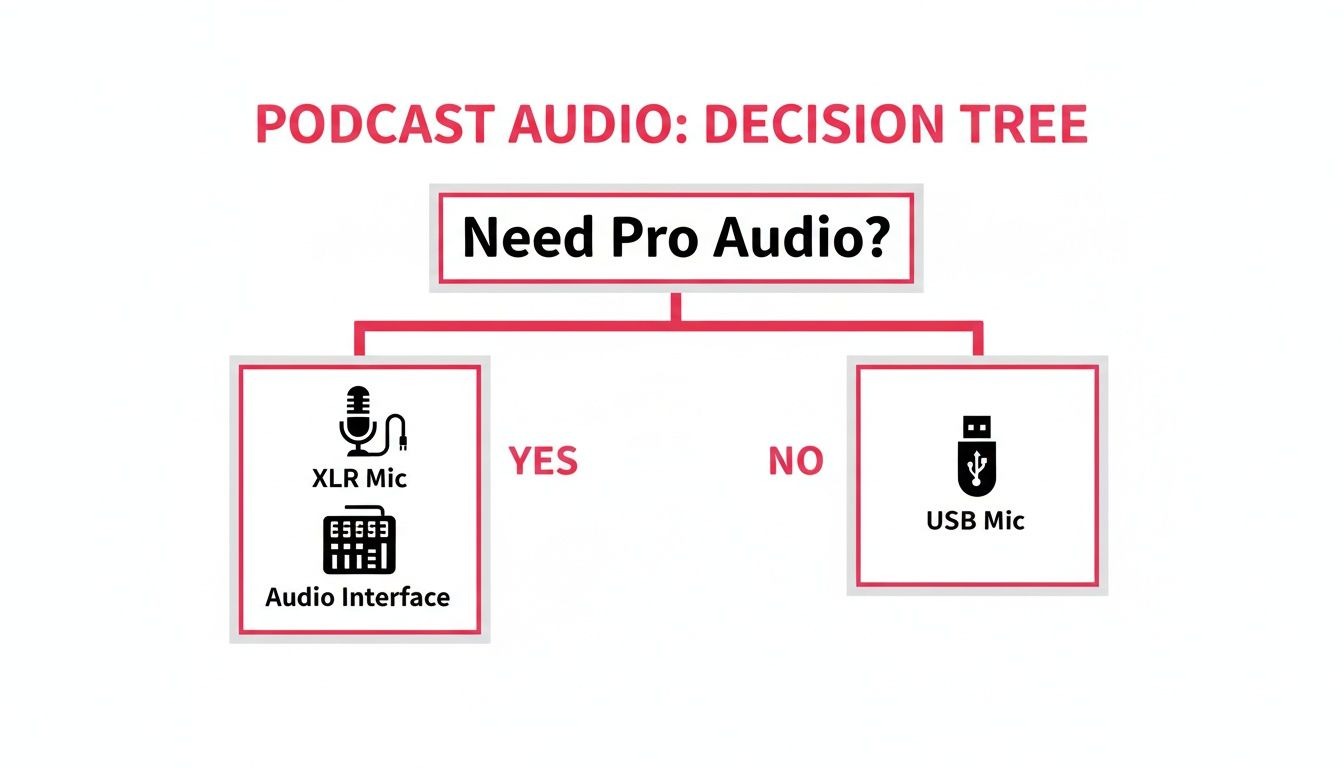
It’s pretty straightforward. If you’re aiming for professional-grade control and want the ability to expand your setup later, an XLR microphone with an audio interface is the only way to go. For everyone else, a high-quality USB microphone offers a simple, direct-to-computer solution that still sounds fantastic.
Sample Equipment Setups by Budget
To make this even more tangible, I've broken down three complete video podcasting kits. This table gives you specific product examples and estimated costs to see exactly how these components come together at different investment levels.
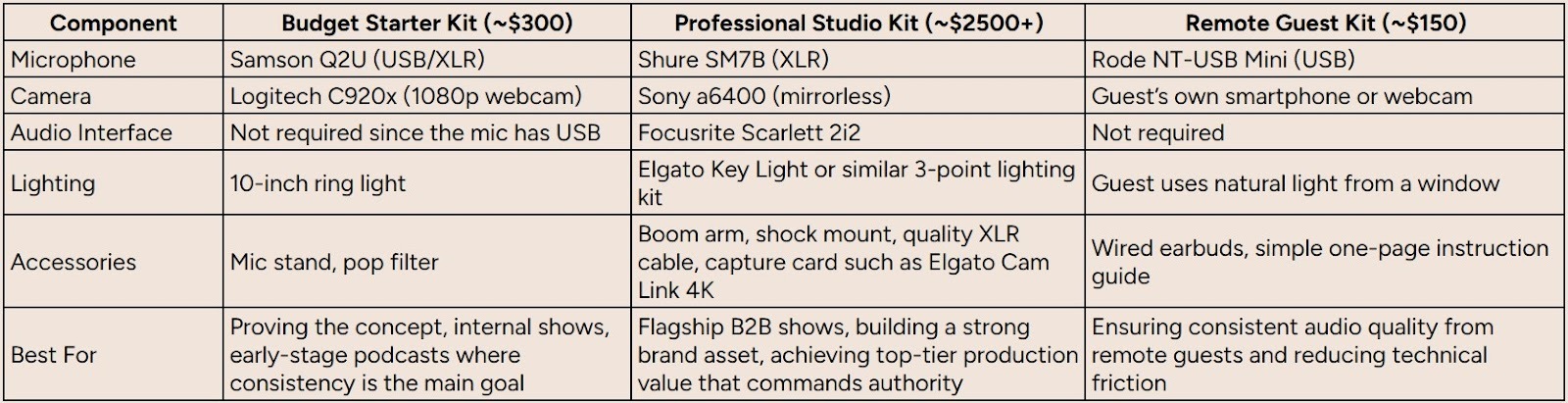
As you can see, "professional quality" is achievable at multiple price points. The real difference is in the level of control, cinematic quality, and scalability you get as you invest more into your setup.
The Scrappy Starter Kit
Getting a video podcast off the ground doesn't have to drain your marketing budget. In fact, you can get surprisingly professional results with just a few hundred dollars if you're smart about where you spend it. This setup is perfect for teams looking to prove the concept by focusing on what matters most: clean audio and clear video.
Think of this as your minimum viable product for creating great content.
- Microphone: A high-quality USB mic like the Samson Q2U is a fantastic starting point. It's a dynamic microphone, which is a huge plus because it naturally rejects background noise, perfect for a less-than-perfect recording space like a home office.
- Camera: A solid 1080p webcam, like the workhorse Logitech C920x, is a massive leap up from any built-in laptop camera. It delivers a sharp, clean image that looks great on any platform.
- Lighting: A simple 10-inch ring light is the cheapest, most effective way to improve your video quality. Good lighting is non-negotiable, and this little piece of gear eliminates unflattering shadows and makes you look bright and clear.
This kit is proof that when you're creating educational videos on a budget, a few smart choices make all the difference. You get excellent audio and video, allowing you to focus your energy on what really matters: the content itself.
The Professional In-House Studio
When your B2B brand is ready to go all-in on a flagship show, it’s time to invest in a dedicated studio setup. This isn't just about gear; it's a signal to your audience, guests, and competitors that you are a serious player in your industry. This package is all about achieving premium production value that reflects an authoritative brand.
This setup is built for control, quality, and consistency, episode after episode.
- Microphone: The Shure SM7B is the industry standard for a reason. This XLR microphone delivers that classic, rich broadcast vocal sound you hear on top podcasts and radio shows.
- Audio Interface: To power an XLR mic, you need a solid audio interface. The Focusrite Scarlett 2i2 is a bulletproof choice that provides clean power and precise control over your audio levels.
- Camera: A mirrorless camera like the Sony a6400 is what separates good video from great video. It gives you that cinematic look with a shallow depth of field (that blurry background effect) that instantly elevates your entire production.
- Lighting: A full three-point lighting system, often using adjustable LED panels like the Elgato Key Light, ensures you look perfectly lit from every angle. It creates depth and eliminates any harsh shadows, giving you a truly professional look.
This is the kind of gear that allows you to produce content that rivals established media companies, reinforcing your position as an industry leader. To get a better sense of the numbers, check out our guide on how much it costs to start a podcast.
The Scalable Remote Guest Kit
Let's be honest: one of the biggest headaches in video podcasting is the inconsistent quality you get from remote guests. A brilliant conversation can be totally derailed by a guest's fuzzy webcam or tinny, echoing microphone.
The solution? Control the controllables. Send your guests a simple, foolproof recording kit.
As our founder, Tom Hunt, often says, remote recordings make it easier to book high-profile guests since they don't need to travel. Eliminating technical friction for them is a huge advantage.
Shipping a small kit isn't just about quality control. It's a professional courtesy that shows your guest you value their time and want them to sound their best.
- Microphone: An easy-to-use USB mic like the Rode NT-USB Mini is perfect. It's truly plug-and-play and delivers crisp, clear audio with zero fuss.
- Headphones: Always, always include a pair of simple wired earbuds. This is non-negotiable. It stops their speaker audio from bleeding into their microphone and kills the latency issues that plague Bluetooth headphones.
- Simple Instructions: A one-page guide is all you need. Include a few dead-simple tips like, "Sit facing a window for great natural light," and "Please close all other applications on your computer."
This small investment protects the production value of your entire show, ensuring everyone involved, host and guest, looks and sounds fantastic.
Choosing the Right Software and Accessories
Hardware is only half the story. Your camera and microphone are just capturing raw ingredients; it's the right software and a few key accessories that cook those recordings into a polished, professional final product.
Think of it this way: your software is the digital production studio, and accessories are the small, practical items that prevent those classic recording headaches. They are the unsung heroes of any serious video podcasting setup, and they make a massive difference in your day-to-day workflow and final output.
Remote Recording and Editing Software
In the B2B world, remote recordings aren't a novelty; they're the standard. It's how you book high-profile guests without burning your budget on flights and hotels. But to do it right, you absolutely need a dedicated remote recording platform.
Tools like Riverside are total game-changers here. Instead of just recording a compressed video call, these platforms record separate, high-quality audio and video tracks locally on each person's computer. This is huge. It means that even if a guest's internet glitches out mid-sentence, you still get a crystal-clear, uncompressed recording from them. This one feature will save you from countless audio disasters.
Once you’ve got your raw files, you need to edit them. Your choice here really boils down to your team's technical skill and how much control you need.
- User-Friendly Editors: Tools like Descript have completely flipped the script on editing. It transcribes all your audio and video, letting you edit your podcast by simply editing a text document. See an "um" or a rambling sentence in the transcript? Just delete the text, and the corresponding video clip disappears. It's incredibly intuitive, especially for folks who aren't career video editors.
- Professional Suites: For maximum control, you'll want to turn to industry-standard software like Adobe Premiere Pro. This is the go-to for teams with dedicated editors who need to manage complex timelines, color grading, and advanced motion graphics. It’s got a steeper learning curve, but the creative ceiling is practically limitless.
Picking the right software is mission-critical for an efficient workflow. For a much deeper look, check out our guide on the best video podcast software tools for B2B podcasters.
Essential Accessories for Professional Polish
While software handles the post-production magic, a handful of accessories will make sure you’re capturing the best possible source material to begin with. These are small investments that pay massive dividends in professionalism and help you dodge common, amateurish mistakes.
"One thing people worry about is guests not having good equipment for remote recordings. We recommend wired headphones (not Bluetooth if possible, these can cause problems) and sitting in front of a window to get natural light." - Tom Hunt, Founder of Fame.
Tom's advice gets right to the heart of it: simple, effective accessories are key. Here are the absolute must-haves for any serious video podcaster:
- Wired Headphones: This is a non-negotiable rule for both you and your guests. Bluetooth headphones introduce a tiny delay (latency) that can throw off the conversation and are notorious for connection drops. More importantly, using headphones prevents the audio from your guest's speakers from bleeding into their microphone, which creates a nasty echo that is nearly impossible to fix later.
- Boom Arm: A boom arm clamps right onto your desk and lets you position your microphone perfectly in front of your mouth, without it taking up desk space or cluttering your video shot. This is the secret to getting consistent audio levels and maintaining that clean, professional look on camera.
- Shock Mount: This is the little cage-like cradle your microphone sits in. Its job is to isolate the mic from any vibrations traveling through your desk or mic stand. Accidentally bump the desk? Heavy typing? Without a shock mount, those vibrations turn into a low, rumbly noise in your audio. With one, it's complete silence.
- Pop Filter: That simple screen you see between a podcaster and their microphone? That's a pop filter. It's designed to diffuse the harsh burst of air from "p" and "b" sounds (known as plosives), which can cause a disruptive popping noise in your recording. It’s a cheap and simple accessory that makes vocals sound infinitely cleaner.
Your Pre-Recording Checklist for Flawless Sessions
Even the most expensive video podcasting equipment is useless without a solid pre-flight check. Trust me, you don't want to find out your camera battery is dead or your guest's audio is unusable after you’ve recorded for an hour.
A repeatable checklist is your secret weapon against the technical gremlins that ruin great conversations and create hours of post-production headaches. Running through these steps before every session doesn't just prevent disaster; it builds the confidence you need to host a smooth, professional show.
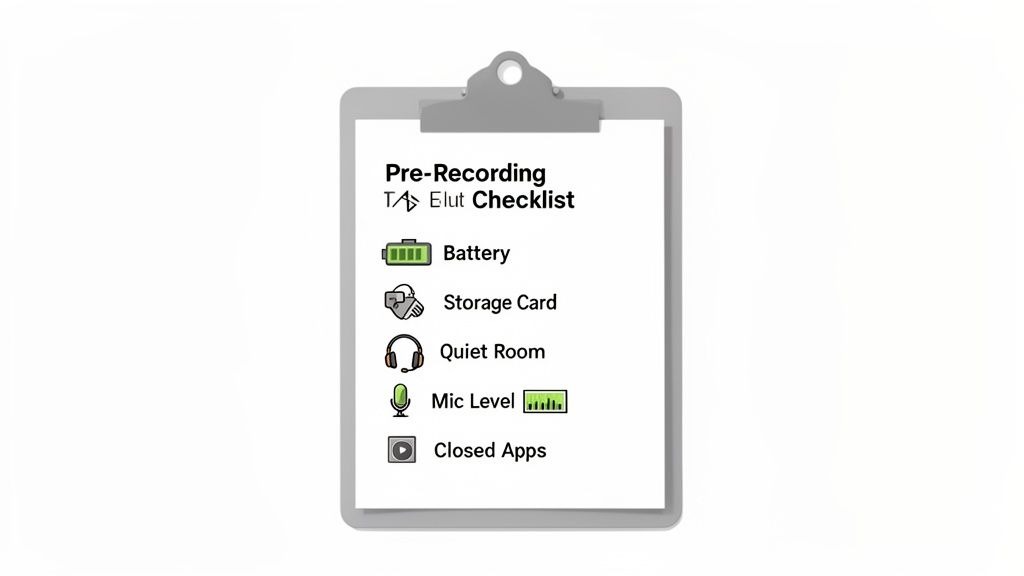
This process isn't just about you, either. It’s about setting your guests up for success so the entire episode shines.
The Host and Production Checklist
Before you even think about hitting record, take ten minutes to run through this technical and environmental check. It's the most important ten minutes of your production process.
- Check All Power Levels: Are your camera batteries juiced up? Is your laptop plugged in? Power failures are the most avoidable and catastrophic issues you can face. Don't let a dead battery kill a great episode.
- Confirm Storage Space: Glance at your camera's SD card and make sure it has plenty of room. Don't forget to double-check your computer's hard drive, especially if you’re recording locally with a platform like Riverside.
- Test All Audio Inputs: This is a big one. Do a soundcheck for every single person on the call. Make sure their microphone is selected in the software and that their audio levels are hitting that sweet spot, not too quiet, but definitely not peaking in the red.
- Frame Your Shot: Take a look at your camera angle. Is the lighting right? Is there anything distracting in your background? A little tidying up goes a long way.
- Minimize System Load: Close every single unnecessary application on your computer. Quit Slack, shut down your email, and close all those extra browser tabs. This frees up precious CPU and RAM, preventing lag and stopping your recording software from crashing mid-sentence.
The Guest Preparation Checklist
Sending your guest a simple set of instructions beforehand makes a world of difference. It shows you’re a pro and helps them give you their best performance.
A common worry is that guests won't have the right equipment. Our go-to advice is simple: use wired headphones (not Bluetooth!) and sit facing a window for great natural light. It's an instant video quality boost. If you have the budget, sending an affordable mic like a Blue Yeti is a fantastic touch.
Here’s a simple list to share with them:
- Find a Quiet Space: Ask them to find a room with minimal echo, away from background noise like dogs, kids, or street traffic. Carpeted rooms are your friend.
- Use Wired Headphones: Gently explain that this is non-negotiable. It’s the only way to kill audio echo and annoying latency issues.
- Wear Solid Colors: Advise them to avoid busy patterns, thin stripes, or complex graphics. These can create a weird, distracting moiré effect on camera.
- Silence All Notifications: Remind them to put their phone on silent and turn off all computer notifications. Nothing kills the flow like a Slack notification dinging in the middle of a profound thought.
For a more detailed guide you can send directly to your guests, check out our post on how to prepare for a podcast guest appearance. This simple, repeatable process is the foundation for consistently flawless recordings.
When to Partner with a B2B Podcast Agency
Buying all the right video podcasting equipment feels like a huge win, and it is. But it’s just the first step. The real marathon begins after you hit record. Post-production, creating all those social assets, and promoting every episode consistently, these are the tasks that quietly swallow an in-house marketing team whole.
The tipping point usually comes when your team is spending more time fiddling with audio edits and designing social clips than they are on your core business. If your podcast starts to feel more like a content chore than a strategic growth driver, that’s your signal.
The goal isn't just to make a podcast; it’s to build a reliable engine that fuels your pipeline and solidifies your authority.
Beyond Production to Strategic Outcomes
Working with a specialized B2B podcast agency shifts the entire conversation from "how does this sound?" to "what business results are we getting?" A true partner, like Fame, isn’t just there to clean up your audio. We’re here to weave your podcast into the fabric of your marketing strategy, turning it into a machine for generating qualified leads and cementing you as an industry leader.
This is way more than just editing. It’s a full-stack approach that includes:
- Guest Management: We don’t just book guests; we source and prep high-profile leaders who actually align with your brand and will resonate with your audience.
- Asset Creation: Every episode becomes a complete marketing campaign. We’re talking social media videos, in-depth blog posts, and compelling newsletter content, all derived from a single recording.
- Strategic Promotion: We make sure your content doesn't just get published, it gets seen by your ideal customer on the platforms they live on, like LinkedIn.
- Performance Guarantees: We don’t just hope for growth; we guarantee it. We promise a 10% monthly download growth, transforming your podcast from a cost center into a predictable source of brand momentum.
Transforming Your Podcast into a Growth Engine
For B2B marketers, top-notch hardware is all about projecting authority. That effect is multiplied when you pair it with professional production that consistently drives audience growth, an area where an agency like Fame guarantees results. To get a sense of how equipment trends are shaping the B2B space, check out these insights on the podcasting hardware market.
"We built our entire workflow around a single question: How does this activity help our B2B clients generate pipeline? If it doesn’t, we don’t do it. That’s the difference between a production service and a growth partner." - Tom Hunt, Founder of Fame.
Ultimately, bringing on an agency is a strategic investment in efficiency and ROI. It frees your team to do what they do best while ensuring your podcast isn't just a side project, but a high-performing marketing channel. You can check out a curated list of the best B2B podcast agencies to see how a dedicated partner can elevate your strategy and deliver results you can actually measure.
Your Top Questions About Video Podcast Gear, Answered
Jumping into video podcasting equipment can feel like a minefield, but you can navigate it with a few core ideas in mind. Let’s tackle the most common questions we hear from B2B marketers as they gear up for a show that actually looks and sounds professional.
Can I Just Use My Smartphone Instead of a Dedicated Camera?
Look, modern smartphones are incredible pieces of tech, but for a professional B2B podcast, a dedicated mirrorless camera is a non-negotiable step up. You're not just buying a camera; you're buying superior low-light performance, that cinematic blurred background (what we call a shallow depth-of-field), and a clean HDMI output so you can stream without your battery icon showing up on screen.
When you're building authority for your brand, that leap in video quality sends a powerful signal. It says you're serious, and it's a level of polish a smartphone just can't replicate.
What Is the Single Most Important Piece of Equipment to Upgrade First?
Your microphone. Audio quality is the absolute foundation of your podcast. It's not even a debate.
Think about it: your audience will put up with video that's a little grainy or poorly lit, but they will click away immediately if your audio is muffled, echoey, or full of background noise. Moving from a built-in mic to a solid USB or XLR microphone will give you the single biggest bang-for-your-buck improvement you can make. Get the audio right first, then worry about the camera and lights.
How Can I Ensure My Remote Guests Look and Sound Professional?
The trick here is to stop hoping for the best and start planning for it. First, use a remote recording platform designed for this, like Riverside. It's a game-changer because it records separate, high-quality audio and video tracks locally on each person's computer, so a bad internet connection doesn't ruin your episode.
"One thing people worry about is guests not having good equipment for remote recordings. We recommend wired headphones (not Bluetooth if possible, these can cause problems), sitting in front of a window to get natural light improves video quality, you can even send cheaper equipment to guests as a gift if you have the budget." - Tom Hunt, Founder of Fame.
Next, don't assume your guests know what to do. Send them a simple one-page guide with tips. For your A-list guests, seriously consider sending them a "guest kit" with an affordable USB mic and a small ring light. It's a small investment that protects the quality of your entire show.
Ready to turn your podcast from just another content project into a strategic growth engine? Fame handles every last detail, from production to promotion, guaranteeing results so you can focus on what you do best: building your brand.
Learn how our B2B podcast agency can help you generate pipeline and authority.
Want us to run this for you?
Fame starts and grows B2B podcasts that generate pipeline. Tell us who you are trying to reach and we will send a costed proposal within 1 working day.
Related content
- Read moreFame Team · July 16, 2026
10 Account Based Marketing Tactics For B2B Growth In 2026
Discover 10 actionable account based marketing tactics for B2B tech. Learn to use podcasts, data, and targeted content to close high-value accounts. - Read moreFame Team · July 16, 2026
The 8 Best Brighton Podcast Agency Picks For 2026
Find the best Brighton podcast agency for your B2B brand. Our 2026 guide reviews top 8 agencies for production, growth & ROI. Expert analysis here - Read moreJune 10, 2026
20 Best Podcast Production Agencies For 2026 (And Why Should You Hire One)
Global podcast and vodcast ad revenues are on track to hit $5 billion in 2026 , up 20% year-on-year. - Read moreApril 13, 2026
Leadership In Marketing: The B2B Podcast Playbook
Most companies still confuse leadership in marketing with job titles, org charts, and budget control. That's outdated.