December 2, 202511 min read6 sections
How To Put A Podcast On Spotify: A Step-by-Step Guide
By Fame Team
Key Takeaways
- Choosing a reliable podcast hosting platform is crucial to get your podcast in front of millions of listeners on Spotify and other directories.
- A B2B-focused podcast host should offer features that contribute to marketing efforts, including reliable uptime and storage, actionable analytics, and one-click distribution to major directories.
- The right podcast host can be a strategic partner for B2B creators, automating technical tasks and providing tools for growth, allowing them to focus on creating high-value content that attracts their ideal customer.
Before you can get your podcast in front of millions of listeners on Spotify, you need a reliable place to store your audio files and generate an RSS feed. This is where a podcast hosting platform comes in.
Think of your host as the command center for your podcast. It stores your audio files, generates the RSS feed that directories like Spotify need to find you, and provides the tools to distribute your show everywhere. A great host makes the entire process seamless.
Step 1: Choose a B2B-Focused Podcast Host
For B2B creators, your podcast is a strategic marketing asset, not just a hobby. You need a host that supports your business goals, helps you generate leads, and reinforces your brand's authority. Standard hosting platforms often fall short because they aren't built with these needs in mind.
What to Look For in a B2B Podcast Host
When podcasting for business, you need features that directly contribute to your marketing efforts. As you evaluate your options, prioritize hosts that offer tools designed for growth.
Here’s your checklist for a B2B-ready host:
- Reliable Uptime & Storage: Your host must be dependable. If it goes down, your podcast disappears from Spotify. Look for a service with a proven uptime record.
- Actionable Analytics: You need to know who is listening, where they are, and which content resonates most. Look for analytics that show listener demographics and episode drop-off rates so you can refine your content strategy.
- One-Click Distribution: Your host's primary job is to make distribution easy. It must generate a valid RSS feed and simplify the submission process to major directories like Spotify and Apple Podcasts.
- B2B Growth Tools: This is where specialized hosts shine. Check out this blog post for inspiration.
The right host is a strategic partner. It automates tedious technical tasks so you can focus on what matters: creating high-value content that attracts your ideal customer.
Why Fame Host is Built for B2B Podcasters
While many hosts can get you listed, a platform built specifically for B2B, like Fame Host, is designed to help you generate revenue.
It includes features that other hosts overlook, such as one-click submission to Spotify, AI-powered show notes to save you hours in post-production, and streamlined guest management workflows. Choosing a host that understands the B2B landscape from day one sets you up to create a professional, high-quality podcast that functions as a powerful marketing asset.
Step 2: Prepare Your Podcast for Submission
Before submitting to Spotify, you must get your technical and branding assets in order. A successful launch depends on meeting Spotify's requirements and presenting a professional brand that attracts a B2B audience.
First, ensure your audio quality is top-notch. Spotify has technical standards to maintain a consistent listening experience. Adhering to these specifications prevents playback issues and signals to listeners that your show is high-quality. For a complete breakdown of equipment, check out our guide to the best podcasting setup.
Master Your Audio and Metadata
Start by exporting your final audio files with these specifications:
- File Format: Export as an MP3. This is the universal standard for podcasts, offering the best balance of quality and file size.
- Bitrate: Use 128 kbps stereo. This provides clear audio without creating large files that are difficult for listeners to stream or download.
- Loudness: Normalize your audio to -14 LUFS (Loudness Units Full Scale). This industry standard ensures listeners don't have to adjust their volume when switching between podcasts.
Next, focus on your metadata, the text and images that represent your show on Spotify. This is your chance to capture the attention of busy professionals.
For a B2B podcast, your metadata is your value proposition. It must instantly tell your target audience who the show is for and what problem it solves.
Use this checklist to ensure your metadata is optimized for a B2B audience on Spotify.
Podcast Metadata Checklist for Spotify
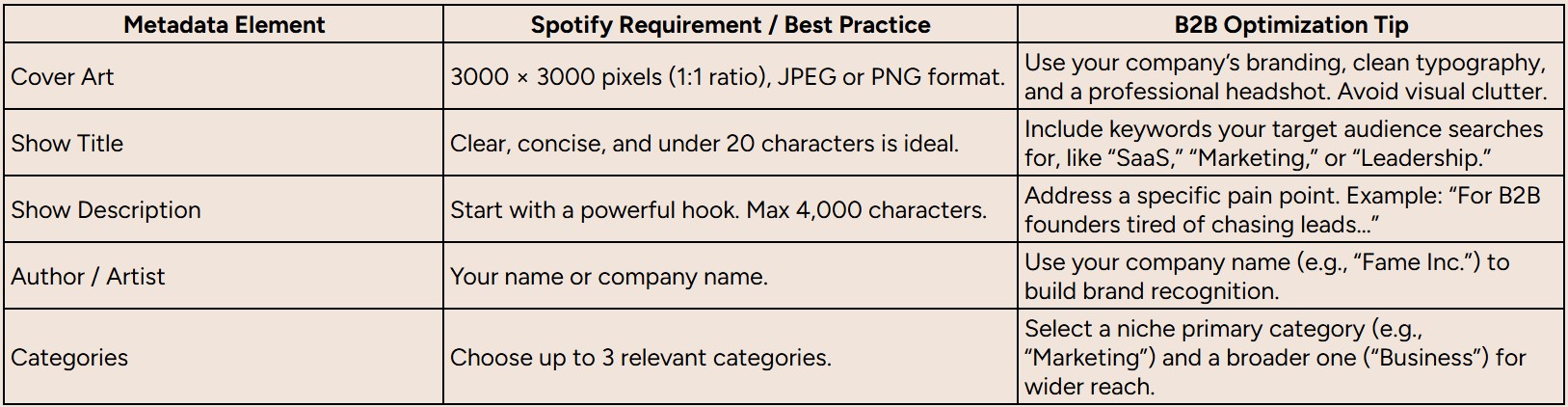
Getting these details right is crucial for a successful submission and long-term discoverability.
Craft a Professional B2B Brand on Spotify
Your branding is what makes you stand out in a crowded market. A polished cover art and a compelling description can be the deciding factor for a busy executive.
Your podcast cover art is your show's digital billboard. It must be a 3000 x 3000 pixel square image (1:1 ratio) in JPEG or PNG format. For a B2B show, prioritize a clean design with your company's branding and a professional headshot or logo that conveys credibility.
Your show description is where you use copywriting and SEO to attract your ideal listener. Don't just describe your podcast; sell the benefit. Start with a hook that addresses a key pain point.
For example, instead of "A podcast about marketing," write "The go-to podcast for SaaS leaders looking to build a scalable demand generation engine." This immediately qualifies your audience and promises tangible value.
Step 3: Submit Your Podcast to Spotify
With your assets prepared, it's time to submit your show to Spotify. The entire process hinges on one key element: your RSS feed.
The RSS feed is a unique URL that tells Spotify where to find your new episodes, cover art, and show notes. Your podcast host generates and maintains this feed for you. On a platform like Fame Host, you can find your RSS feed on your main dashboard, typically under a "Distribution" tab, ready to be copied with one click.
The Spotify for Podcasters Submission Process
Once you have your RSS feed URL, go to the Spotify for Podcasters platform. This is Spotify's portal for creators, where you will officially submit your show.
Here is the step-by-step submission process:
- Create an Account: Go to Spotify for Podcasters and sign up. You can link it to an existing Spotify account or create a new one.
- Add Your Podcast: Click "Get Started" or "Add your podcast" and paste the RSS feed URL you copied from your host.
- Verify Ownership: Spotify will send a verification code to the email address listed in your RSS feed (which you set in your host's dashboard). Enter this code to confirm you own the podcast.
This workflow diagram shows how your prepared assets all come together before you reach the submission step.
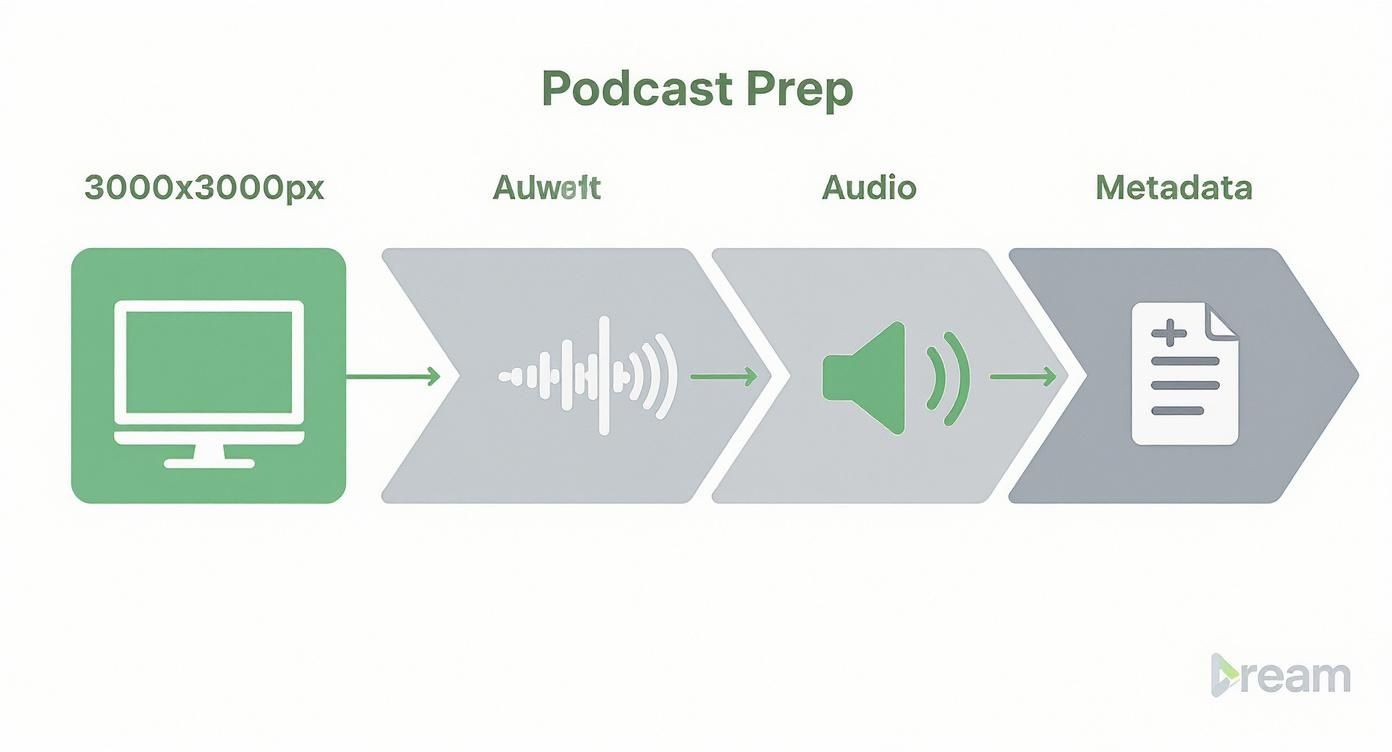
As you can see, a smooth submission is built on a foundation of well-prepared assets.
Navigating Submission and Approval
After verification, you will add a few more details, such as your podcast's country and categories. Review everything and click "Submit."
Spotify's approval process is typically fast. Most shows are approved and live within a few hours, though it can sometimes take up to a couple of days. Once approved, your podcast will be available to listeners worldwide.
What to do if you get an error: Don't worry. Submission errors are almost always caused by simple mistakes made before submission, like an invalid RSS feed or incorrectly formatted cover art. Double-check your settings in your hosting platform, fix the issue, and resubmit.
Most of these issues can be avoided with a well-defined process. For B2B creators, a solid podcast production workflow is key to preventing these frustrating errors and ensuring every asset is correct before you submit.
Step 4: Optimize Your Podcast for Discovery on Spotify
Getting your podcast listed on Spotify is just the beginning. The next step is to ensure the right people find it. This requires a strategic approach to optimization that aligns with Spotify's discovery algorithms.
For a B2B show, you must think like a marketer. Your episode titles are headlines designed to capture the attention of a busy professional by promising a solution to a real business problem. Instead of a generic title like "Episode 5 with Jane Doe," use a keyword-rich, benefit-driven title like "How to Triple MQLs with Intent Data ft. Jane Doe." This title instantly communicates value to your ideal listener.
Leaning Into Spotify's Discovery Engine
To get discovered, you need to understand how listeners find new shows. Spotify’s home screen drives 64.9% of all impressions, while search accounts for another 25.7%. With the average show receiving over 568,000 impressions a month, your metadata and artwork are your primary tools for getting seen.
For more insights, you can explore benchmarks on podcast conversion rates on Spotify. This data makes it clear: you need a targeted strategy. Your show description, episode titles, and guest selection should all align with what your target audience is searching for.
The Spotify algorithm prioritizes engagement. Every follow, share, and full-episode listen signals that your content is valuable, making the algorithm more likely to recommend your show to new listeners.
To leverage this, include clear calls-to-action (CTAs) in your episodes. A simple request like, "If you're enjoying the show, hit 'follow' on Spotify so you never miss an episode," can significantly boost your follower count and improve your visibility.
Building a Cohesive Promotion Strategy
Promote your podcast across all your professional channels to build initial momentum and drive traffic to your Spotify page.
- Leverage Guest Networks: When you feature a guest, make it easy for them to share the episode. Provide them with a direct Spotify link and pre-written social media copy for LinkedIn.
- Use Your Email Newsletter: Embed your latest Spotify episode in your company's newsletter to reach an engaged audience.
- Apply SEO Principles: Treat your podcast like any other piece of content. Applying podcast SEO best practices for explosive growth can dramatically increase your visibility on Spotify.
By combining on-platform optimization with off-platform promotion, you create a feedback loop that drives your ideal listeners to Spotify, signaling to the algorithm that your podcast is a high-quality show worth recommending.
Step 5: Turn Spotify Listeners into Business Leads

Your podcast is live on Spotify, but the work isn't over. For B2B brands, the ultimate goal is to convert listeners into leads and customers. To do this, you must move beyond vanity metrics like download numbers and focus on data that drives business results.
Your Spotify for Podcasters dashboard provides valuable insights into your audience and content performance. Use this data to refine your strategy and identify lead-generation opportunities.
Interpreting Your Spotify Analytics for Growth
Spotify's analytics offer a direct look at what's working. Focus on these key metrics to guide your strategy:
- Audience Demographics: Are you reaching the right people? Check the age, gender, and location data. If you're targeting VPs in the US but your audience is primarily interns from another country, you have a content or targeting issue to address.
- Episode Drop-off Rates: This is your most critical metric for content improvement. If you see a significant drop-off at the 10-minute mark, listen to that section to identify what went wrong. Use this feedback to create more engaging content and ensure listeners hear your call-to-action.
A B2B podcast's success is measured by its ability to build authority and nurture a sales pipeline, not just by download numbers. The real ROI comes from high-quality engagement.
To manage the leads your podcast generates, implement solid CRM solutions. This will help you track interactions and guide prospects through your sales funnel effectively.
From Listener Engagement to Lead Generation
With a clear understanding of your audience, you can build a repeatable lead-generation process. This involves including strategic calls-to-action (CTAs) in your episodes that guide listeners on what to do next.
Instead of a generic sign-off, provide a specific, valuable action. For example:
- "If you're struggling with X, I've created a free checklist you can download at yourcompany.com/checklist."
- "We're hosting a private webinar on this topic next week. Sign up using the link in the show notes."
These CTAs transform your podcast into a top-of-funnel marketing channel. A well-defined business plan for your podcast ensures every episode contributes to a specific business goal.
In 2025, the podcasting landscape is enormous, with 584 million global listeners and an industry valued at $39.63 billion. Spotify dominates with 37% of the audience, giving you direct access to a vast pool of potential customers.
Answering Your Last-Minute Spotify Questions
You're ready to launch, but it's normal to have a few final questions. Here are quick answers to the most common queries from B2B creators to help you launch with confidence.
How Long Does It Take for My Podcast to Appear on Spotify?
Once you submit your RSS feed via Spotify for Podcasters, the review process typically takes a few hours to five business days. Most new podcasts go live within 24-48 hours.
After your show is approved, new episodes will appear much faster, usually within a few hours of publishing, although it can sometimes take up to 24 hours for Spotify's feed to refresh.
Can I Put a Video Podcast on Spotify?
Yes, absolutely. Spotify fully supports video podcasts, which is a powerful way for B2B creators to connect with their audience by showcasing presentations, product demos, or simply building a stronger personal connection.
To do this, you need a hosting provider that supports video, like Fame Host. The platform allows you to upload video files as easily as audio, which are then included in your RSS feed for distribution on Spotify.
What Should I Do If Spotify Rejects My Podcast?
Don't panic. If your submission is rejected, Spotify will tell you why, and it's usually an easy fix.
Common reasons for rejection include:
- Artwork Issues: Your cover art isn't a perfect 1:1 square ratio or doesn't meet the 3000x3000 pixel size requirement.
- Invalid RSS Feed: Your feed is missing required information like a show description or category.
- Content Violations: Your podcast content does not comply with Spotify's content policies.
Simply log in to your hosting platform, correct the issue, and resubmit your feed.
A rejection from Spotify is rarely a final decision. It's typically a technical flag to ensure all shows on the platform meet a consistent quality standard.
Do I Have to Pay to Put My Podcast on Spotify?
No. Listing your podcast on Spotify is 100% free. Spotify does not charge creators to submit or host their shows on its platform.
The only cost involved is your media hosting service, the platform that stores your audio files and generates the RSS feed required for distribution.
Ready to launch a B2B podcast that actually drives business results, minus the technical headaches? Fame Host gives you the specialized tools you need, from one-click Spotify submission and video support to AI-powered show notes. Check out the hosting platform built for B2B growth at Fame.
Want us to run this for you?
Fame starts and grows B2B podcasts that generate pipeline. Tell us who you are trying to reach and we will send a costed proposal within 48 hours.
Related content
- Read moreFame Team · July 16, 2026
10 Account Based Marketing Tactics For B2B Growth In 2026
Discover 10 actionable account based marketing tactics for B2B tech. Learn to use podcasts, data, and targeted content to close high-value accounts. - Read moreFame Team · July 16, 2026
The 8 Best Brighton Podcast Agency Picks For 2026
Find the best Brighton podcast agency for your B2B brand. Our 2026 guide reviews top 8 agencies for production, growth & ROI. Expert analysis here - Read moreJune 10, 2026
20 Best Podcast Production Agencies For 2026 (And Why Should You Hire One)
Global podcast and vodcast ad revenues are on track to hit $5 billion in 2026 , up 20% year-on-year. - Read moreApril 13, 2026
Leadership In Marketing: The B2B Podcast Playbook
Most companies still confuse leadership in marketing with job titles, org charts, and budget control. That's outdated.