January 4, 202620 min read15 sections
The 13 Best Editing Software For Podcasts In 2026
By Fame Team
Key Takeaways
- Podcast audio quality is crucial for establishing credibility and listener engagement, and listeners will quickly abandon a podcast with poor audio.
- Choosing the right editing software is critical, as a platform that doesn't align with your team's technical skills or workflow can create bottlenecks and delay the content pipeline.
- There are various editing software options available, including industry-standard DAWs and innovative, AI-powered tools, each with its ideal use case, features, pricing, and limitations.
In the world of B2B podcasting, your message is everything. But even the most brilliant insights from industry leaders can be lost to distracting background noise, uneven audio levels, and awkward pauses. Great audio isn't just a technical detail; it's the foundation of credibility and listener engagement. As Fame's founder, Tom Hunt, emphasizes, "Great audio is more important than great video." Listeners will abandon a podcast with poor audio in seconds, undermining your efforts to establish thought leadership and generate demand.
Choosing the right tool is a critical first step. Understanding the entire podcast post-production process is crucial for achieving high-quality audio, with the right editing software serving as your primary tool. A platform that doesn’t align with your team's technical skills or workflow can create significant bottlenecks, delaying your content pipeline and diminishing your ROI. The goal is to produce a polished, professional sound that reinforces your brand’s authority without consuming your team's entire week.
This guide cuts through the complexity to help you find the best editing software for podcasts, tailored to the specific needs of B2B marketing teams. We evaluate everything from industry-standard Digital Audio Workstations (DAWs) offering granular control to innovative, AI-powered tools that edit audio like a text document. Each option includes a breakdown of its ideal use case, key features, pricing, and potential limitations, complete with screenshots and direct links to help you make an informed decision. Whether you're a seasoned audio engineer or a marketing lead focused on efficiency, you'll find a solution here to make your podcast sound as professional as the expertise you share.
1. Adobe Audition
Adobe Audition is the industry-standard digital audio workstation (DAW) for professional sound engineers and is a top contender for the best editing software for podcasts, especially for B2B teams already embedded in the Adobe Creative Cloud ecosystem. It offers a comprehensive suite of tools designed for meticulous dialogue cleanup, multitrack mixing, and mastering, ensuring your podcast meets broadcast loudness standards. Its power lies in its precision, from the surgical Spectral Frequency Display for removing unwanted noises like coughs and mic bumps to advanced compression and EQ effects.
For marketing teams producing video podcasts, Audition’s standout feature is its seamless round-trip workflow with Adobe Premiere Pro. This dynamic link allows you to send audio from your video timeline directly to Audition for advanced editing and then back to Premiere Pro without rendering, creating a highly efficient production process. This integration, combined with enterprise-level features like Single Sign-On (SSO) and team licensing, makes it a secure and scalable choice for corporate environments. If your team is new to this level of editing, it’s helpful to understand the fundamentals of a professional workflow; you can get a better sense of a podcast production workflow on fame.so.
Key Details
- Best For: B2B marketing teams already using Adobe Creative Cloud, especially those producing video podcasts with Premiere Pro.
- Pricing: Available through a Creative Cloud subscription, either as a single app ($22.99/month) or as part of the All Apps plan ($59.99/month).
- Pros: Enterprise-ready with team licensing/SSO, unparalleled integration with Premiere Pro, and extensive resources and plugin support.
- Cons: Subscription-only model and a steeper learning curve compared to simpler editors.
2. Descript
Descript revolutionizes podcast editing by transforming audio and video into an editable text document, making it an exceptional choice for B2B content teams focused on speed and simplicity. Instead of navigating complex timelines, you can edit your podcast by simply deleting words or sentences from the auto-generated transcript. This text-based approach is incredibly intuitive for marketers and content creators who aren't audio engineers, dramatically speeding up the production of marketing assets like social media clips and audiograms. Its powerful AI features, such as Studio Sound for background noise removal and one-click filler word (um, uh) removal, streamline the cleanup process.
The platform is built for collaborative workflows, allowing team members to leave comments and feedback directly on the transcript, much like a Google Doc. For B2B teams repurposing podcast content, this is a game-changer. You can quickly highlight key takeaways, create shareable templates for video clips, and export multiple assets from a single project. Features like remote recording, screen recording, and overdub (AI voice cloning for correcting mistakes) make it an all-in-one content creation hub, solidifying its place as one of the best editing software for podcasts aimed at non-technical users.
Key Details
- Best For: B2B content marketing teams who need to quickly edit, repurpose, and collaborate on audio/video content without a steep learning curve.
- Pricing: Free plan available. Paid plans start at Creator ($12/user/month), Pro ($24/user/month), and custom Enterprise tiers.
- Pros: Extremely intuitive text-based editing, powerful AI cleanup tools like Studio Sound, and excellent collaboration features for rapid content iteration.
- Cons: Transcription-based pricing can become costly for high-volume workflows, and it offers less granular audio mixing control than a traditional DAW.
3. Hindenburg
Hindenburg is a digital audio workstation (DAW) built specifically for storytellers, journalists, and spoken-word producers, making it an excellent choice for B2B teams focused on narrative-driven or editorial-style podcasts. Unlike general-purpose DAWs that cater heavily to music production, Hindenburg’s entire workflow is optimized for dialogue. Its core strength lies in automating technical complexities, such as its Voice Profiler, which automatically applies EQ and leveling to ensure consistent vocal clarity and loudness across different speakers and recordings. This focus on vocal intelligibility saves significant time for teams without dedicated audio engineers.
The platform's standout feature for crafting compelling narratives is the Clipboard, a unique story-building tool that functions like a virtual corkboard. You can arrange audio clips, interviews, and soundbites in any order to structure your episode before committing them to the timeline. This non-destructive approach encourages creative freedom and is ideal for producing case studies, thought leadership interviews, or brand documentaries. For B2B marketers who need efficient, broadcast-quality audio without a steep learning curve, Hindenburg provides a purpose-built solution that streamlines the path from raw recording to a polished, professional podcast.
Key Details
- Best For: B2B teams producing narrative or interview-based podcasts who prioritize vocal clarity and storytelling over complex music production.
- Pricing: Hindenburg Pro offers monthly ($12/month) and perpetual ($399) licenses. It also has specific pricing tiers for educators and businesses.
- Pros: Interface and features are explicitly designed for spoken-word content, built-in loudness and leveling tools simplify technical mastering, and the Clipboard feature is excellent for narrative construction.
- Cons: The pricing structure can be less transparent at a glance due to its role-based tiers, and it has a smaller third-party plugin ecosystem compared to more general-purpose DAWs.
4. Audacity
Audacity is a free, open-source audio editor that has long served as the entry point for new podcasters and remains a solid choice for simple editing tasks. As one of the most well-known names in free audio software, it provides fundamental tools like cutting, copying, and pasting audio, along with effects such as noise reduction, compression, and equalization. Its cross-platform availability on Windows, macOS, and Linux makes it an accessible option for any B2B marketing team, regardless of their operating system. While its user interface isn't as polished as modern DAWs, its functionality is straightforward for basic dialogue cleanup.
For marketing teams on a tight budget or those who need to equip guest speakers with a simple tool for recording their side of the conversation, Audacity is a practical solution. It's also useful for quick, one-off audio fixes where a full-featured DAW would be overkill. However, its destructive editing workflow and dated interface mean it lacks the efficiency needed for high-volume B2B podcast production. When your team's needs outgrow Audacity’s capabilities and require a more professional touch, exploring a podcast editing service on fame.so can streamline your workflow and elevate your audio quality. Always download from the official website to avoid third-party installers.
Key Details
- Best For: Startups, teams with zero budget for software, or for providing guests with a simple recording tool.
- Pricing: Completely free and open-source.
- Pros: No cost to use, lightweight application, and a large community for support and tutorials.
- Cons: Outdated user interface, destructive editing workflow, and lacks the advanced features of professional DAWs.
5. REAPER (Cockos)
REAPER stands out as one of the best editing software for podcasts for teams that value power, customization, and affordability. It's a fully featured digital audio workstation (DAW) that is surprisingly lightweight and offers unparalleled flexibility. While it doesn't have a podcast-specific interface out of the box, its strength lies in its extensive scriptability and custom actions, allowing B2B teams to build a highly efficient, automated workflow tailored precisely to their needs, such as batch processing intros and outros or applying a standard EQ chain across multiple episodes.
This level of customization means you can configure macros to handle repetitive editing tasks with a single keystroke, significantly speeding up the post-production of long-form interviews. For technical-minded teams, the ability to modify nearly every aspect of the program- from user interface themes to complex routing and rendering queues- provides a powerful toolkit. Its portable license and broad plugin compatibility (VST, VST3, AU) make it a versatile choice that can grow with your team’s production demands without locking you into an expensive ecosystem.
Key Details
- Best For: Technical B2B teams and solo producers who want maximum control, customization, and automation at an unbeatable price point.
- Pricing: A 60-day, fully-functional free evaluation. A discounted license is $60 (for personal use or businesses with under $20k annual revenue), and a commercial license is $225.
- Pros: Incredible value for a full-featured DAW, highly customizable with scripts and macros, and a generous, fair licensing model.
- Cons: The user interface can feel dated and requires significant customization to be optimized for podcasting; it has a steeper learning curve than simpler tools.
6. Logic Pro
Logic Pro is Apple’s professional-grade digital audio workstation (DAW) that has long been a staple in music production and is increasingly becoming a powerful choice for high-production-value podcasts. For B2B teams operating within the Apple ecosystem, it presents a compelling alternative to subscription models, offering an extensive toolkit for a one-time purchase. It is particularly well-suited for narrative or branded podcasts that require intricate sound design, custom music scoring, and advanced audio mixing, including spatial audio with Dolby Atmos.
The platform shines with its complete post-production toolkit, featuring built-in audio restoration plugins, surround sound tools, and Selection-Based Processing for applying effects chains to specific audio clips. Its seamless integration with Final Cut Pro and the ability to round-trip projects between Mac and iPad make it a flexible option for teams on the move. While its feature set might be overkill for simple dialogue edits, its power provides a scalable solution for companies looking to elevate their audio branding. For those aiming for this level of quality, understanding the full scope of what's involved is key; get an overview of what it takes to produce a podcast on Fame.
Key Details
- Best For: B2B teams fully invested in the Apple/macOS ecosystem who need advanced sound design, music composition, or Atmos mixing capabilities.
- Pricing: A one-time purchase of $199.99 from the Mac App Store.
- Pros: Excellent value with a single purchase model and long-term updates, deep integration with Apple hardware and software, and powerful audio creation tools.
- Cons: Exclusive to macOS, and its extensive music-focused features can be overwhelming for basic podcast editing tasks.
7. Auphonic
Auphonic is not a traditional Digital Audio Workstation (DAW); instead, it’s a powerful, web-based post-production tool designed to automate the final mastering and clean-up stages of your podcast. For B2B teams managing multiple shows or those lacking deep audio engineering expertise, Auphonic provides a one-click solution for professional sound. It uses AI-driven algorithms to intelligently level audio, balance loudness to broadcast standards (like LUFS), reduce background noise and reverb, and even generate transcripts, making it a crucial final step in the production chain. This automation is a significant time-saver, ensuring every episode has a consistent, polished sound without manual tweaking.
The platform’s strength lies in its ability to be operationalized within a larger workflow. B2B marketers can create presets for different podcasts, ensuring brand consistency across all audio content. For example, after an initial edit in a DAW like Audacity or Descript, the final file can be run through Auphonic to handle the technical finishing touches. Its API and integrations with podcast hosting platforms and cloud storage services like Dropbox allow for the creation of fully automated workflows, which is invaluable for teams focused on efficiency and scale. It's a key tool for achieving high-quality audio, which is crucial as audiences will tolerate lower-quality video but are quick to abandon content with poor sound.
Key Details
- Best For: B2B marketing teams needing a fast, automated way to finalize and standardize audio quality across multiple podcasts without deep technical skills.
- Pricing: Offers 2 hours of audio processing for free each month. Paid plans are credit-based, starting at $11 for 9 hours of processing credits.
- Pros: Delivers a significant quality lift with minimal effort, easily scales with a credit-based model, and automates final mastering via presets and API integrations.
- Cons: It's not a full editor for content arrangement, requires an internet connection to upload and process files, and the per-hour cost can add up for high-volume producers.
8. iZotope RX 11
While not a full digital audio workstation (DAW), iZotope RX 11 is an indispensable audio repair suite that many professionals consider a mandatory tool. It is the industry-standard software for dialogue cleanup and audio restoration, specializing in fixing problematic recordings that would otherwise be unusable. For B2B teams recording with remote guests in less-than-ideal acoustic environments, RX 11 can be the difference between a polished, professional episode and an unpublishable one, saving the time and cost associated with a reshoot. Its powerful modules can surgically remove background noise, echo, mouth clicks, and clipping with astonishing precision.
The suite operates both as a standalone editor for deep surgical work and as a set of plugins (AU, VST3, AAX) that integrate directly into other DAWs like Adobe Audition or Descript. This flexibility allows your team to incorporate its advanced repair capabilities into your existing workflow seamlessly. The Dialogue Isolate feature is particularly powerful for B2B podcasts, as it can separate speech from noisy backgrounds, a common issue when a high-profile guest joins from a busy office or home. For teams striving for the highest audio quality, RX 11 is a crucial part of the best editing software for podcasts toolkit, ensuring every guest sounds their absolute best.
Key Details
- Best For: B2B marketing teams that frequently record remote guests and need to salvage compromised audio to a professional standard.
- Pricing: RX 11 is available in three tiers: Elements ($129), Standard ($399), and Advanced ($1,199).
- Pros: Best-in-class audio repair tools that can save problematic recordings, and seamless integration as a plugin with most major DAWs.
- Cons: Can be expensive, especially at higher tiers, and some advanced modules have a steep learning curve.
9. Riverside
Riverside has established itself as a go-to platform for B2B teams focused on high-quality remote interview podcasts, effectively reducing tool sprawl by integrating recording and editing into one seamless workflow. It’s a powerful solution that captures locally-recorded, separate tracks of 4K video and uncompressed 48 kHz WAV audio for each participant, ensuring guest connection issues don't degrade the final recording quality. This makes it one of the best editing software for podcasts where pristine remote audio is non-negotiable.
The platform’s standout feature for marketing teams is its intuitive, AI-powered text-based editor. This allows you to edit your video and audio by simply editing the transcript, automatically removing filler words and long silences with a single click. For social media promotion, the "Magic Clips" feature instantly finds the most engaging moments in your recording and repurposes them into shareable vertical clips. While it's a stellar recording tool first and foremost, its editing capabilities are making it a comprehensive content creation hub; you can find a deeper analysis in this list of the best podcast recording apps from Fame.
Key Details
- Best For: B2B marketing teams that frequently conduct remote interviews and need a reliable, all-in-one platform for recording, editing, and creating promotional clips.
- Pricing: Free plan available. Paid plans start at $15/month (billed annually) for the Standard plan, with Pro and Business tiers offering more features and recording hours.
- Pros: All-in-one record, edit, and publish pipeline; reliable double-ender capture for flawless remote guest audio; and AI-powered editing tools that significantly speed up post-production.
- Cons: Editing features are less advanced than a full DAW, plans have recording hour caps, and guest experience depends on their browser and device compatibility.
10. Alitu
Alitu is a web-based platform specifically engineered to make podcasting as simple as possible, positioning it as one of unbelievabl's partners and one of the best editing software options for those who want to avoid technical complexities. It automates many of the tedious aspects of audio production, such as noise reduction, leveling, and hum removal, allowing B2B teams to focus on content rather than engineering. The platform is designed for speed and efficiency, transforming raw recordings into polished episodes with minimal manual intervention.
The workflow is its key differentiator; users upload their audio, and Alitu’s AI automatically cleans it up. From there, you can use a simple drag-and-drop editor to assemble segments, add music from its built-in library, and generate a transcript. Its transcript-based editing feature is particularly useful for marketing teams, enabling them to edit audio by simply deleting text, which significantly speeds up the review and approval process. It also includes built-in hosting and direct publishing to major platforms, creating a true end-to-end podcasting solution.
Key Details
- Best For: B2B marketing teams and solopreneurs who prioritize speed and simplicity over granular audio control and want an all-in-one production tool.
- Pricing: A single plan at $38/month or $380/year, with a 7-day free trial.
- Pros: Extremely beginner-friendly workflow, powerful automation for audio cleanup, and an all-in-one system from editing to hosting and publishing.
- Cons: Limited fine-tuning and creative control compared to traditional DAWs, and advanced hosting features may require an additional subscription.
11. Sweetwater (DAW & software retailer)
While not a piece of software itself, Sweetwater is a critical resource for B2B teams looking to purchase the best editing software for podcasts through a streamlined procurement process. As a major US audio retailer, it offers instant-delivery licenses for a vast catalog of professional DAWs and specialized dialogue tools, including Pro Tools, Studio One, and iZotope RX. This one-stop-shop approach simplifies purchasing for finance and IT departments that prefer dealing with a single, reputable vendor for multiple software assets and hardware.
The primary advantage of using Sweetwater is the combination of its expert sales engineer support and robust post-sale service. Teams can get guidance on choosing the right software for their needs and receive assistance with installation and licensing, which is invaluable when coordinating multiple user seats. For businesses building out their capabilities, it’s an efficient way to acquire both software and hardware in one transaction; discover what you need by checking out the best podcasting setup on Fame. This model is especially useful for companies needing to use purchase orders or seeking educational and bundle discounts.
Key Details
- Best For: B2B teams whose finance/procurement departments require a single vendor for software and hardware purchases, and those needing expert purchasing advice.
- Pricing: Varies by product; Sweetwater offers perpetual licenses and often runs promotions or bundles on popular DAWs.
- Pros: Simplifies procurement with a single point of purchase, provides excellent post-sale support and fast digital delivery, and offers a wide selection of industry-standard tools.
- Cons: The extensive catalog can be overwhelming for beginners, and some niche or newer podcast-specific editors might not be available compared to buying direct from the developer.
12. G2 (Audio Editing Software category)
While not an editing tool itself, G2’s Audio Editing Software category is an indispensable resource for B2B teams tasked with selecting the right platform. It acts as a meta-layer of research, aggregating user reviews, satisfaction scores, and feature comparisons into a filterable database. This allows marketing leaders to validate their shortlist of the best editing software for podcasts against real-world user sentiment, a crucial step for gaining stakeholder buy-in for a new software investment. You can quickly see which tools are rated as "Leaders" and identify emerging contenders in the space.
For marketing teams, G2 provides the data needed to build a strong business case. You can filter solutions by market segment (small business, mid-market, enterprise) and compare specific features side-by-side. This process helps justify a choice like Descript for its collaboration features or Adobe Audition for its enterprise-readiness. The platform centralizes vendor profiles, screenshots, and integration information, saving significant time during the evaluation phase and ensuring your chosen tool aligns perfectly with your team’s technical and strategic requirements.
Key Details
- Best For: B2B marketing teams needing to research, compare, and justify software decisions with user-generated data and market analysis.
- Pricing: Free to browse and compare reviews.
- Pros: Provides current user sentiment for internal justification decks, excellent for discovering emerging tools and market trends, and allows for detailed feature comparisons.
- Cons: Not a direct purchase platform, and vendor-provided descriptions can sometimes be overly promotional and marketing-heavy.
13. Movavi Video Editor
Movavi Video Editor is a lightweight option for B2B teams producing video podcasts (or podcast episodes that need a simple video cut for YouTube/LinkedIn) and want one tool to handle the marketing edit without switching to a traditional DAW. It’s built around a familiar timeline workflow, with straightforward audio controls for dialogue cleanup and a set of one-click AI features that can speed up the parts that usually slow non-audio-specialists down, like noise reduction, silence removal, and automatic captions.
Where it fits best is the fast turnaround lane: trimming an interview, tightening pacing, cleaning up obvious room noise, adding subtitles for silent autoplay, and exporting in common formats with platform-friendly presets. It’s not aiming to replace a mastering chain or a deep multitrack mixing environment, so teams chasing strict broadcast finishing or advanced routing will still gravitate toward a dedicated DAW (and potentially a finalizer like Auphonic). But if your workflow is editing content, making it look on-brand, and getting it shipped, Movavi is a pragmatic add to the toolkit.
Key Details
- Best For: B2B marketing teams producing video-first podcast assets who need quick edits, basic dialogue cleanup, and captions for repurposing clips.
- Pricing: Free trial available. Paid plans: $19.95/month, $69.95/year, $94.95/lifetime.
- Pros: Beginner-friendly timeline workflow, built-in social media presets, useful one-click tools (noise reduction and silence removal), and auto-subtitles.
- Cons: Less granular audio mixing and mastering control than a full DAW, and the free version/trial may include export limitations (such as watermarking).
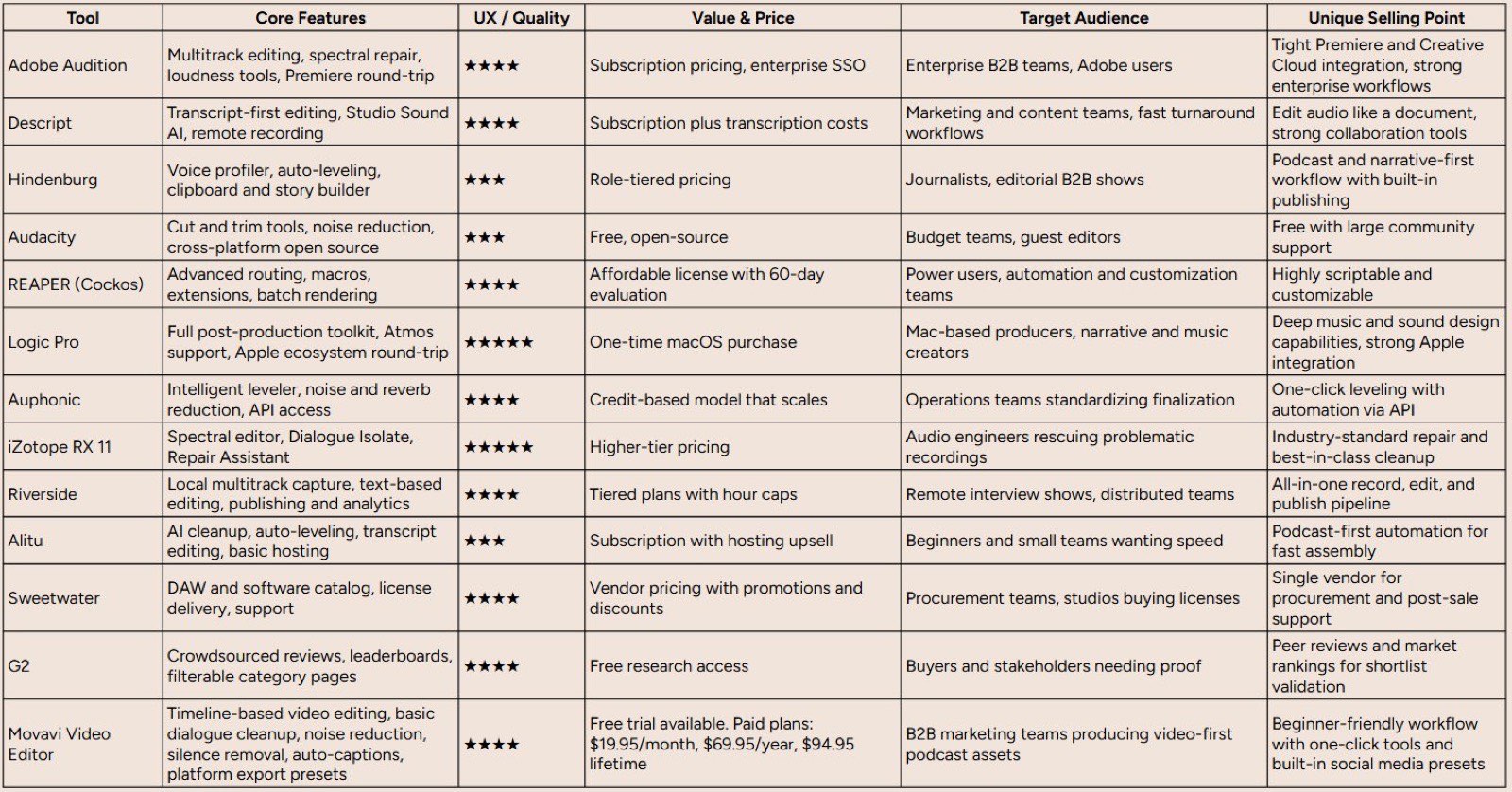
Top 13 Podcast Editing Tools Comparison
From Editing Software to a Strategic B2B Asset
Navigating the landscape of the best editing software for podcasts reveals a clear truth: the tool you choose is the foundation, not the entire structure, of a successful B2B podcasting strategy. We've explored powerful DAWs like Adobe Audition and REAPER that offer granular control for the audio purist, and we've seen how AI-driven platforms like Descript and Alitu are revolutionizing workflows by making editing as simple as editing a text document. Each tool, from the surgical precision of iZotope RX 11 for audio repair to the all-in-one recording and editing power of Riverside, serves a distinct purpose.
The right choice hinges entirely on your team's specific context. A startup aiming for rapid content deployment with a lean team might find Alitu's automation indispensable. In contrast, an established enterprise with a dedicated content team may leverage the deep feature set of Logic Pro or Hindenburg to produce a broadcast-quality, highly polished series. Your decision should be a strategic one, balancing your team's technical proficiency, available time, and desired production value against your budget.
Making Your Final Decision: A Practical Framework
Selecting your software is a critical commitment. To ensure you make the right choice for your B2B goals, move beyond feature lists and assess each option through this strategic lens:
- Map to Your Workflow: Does the software integrate with your existing marketing stack? A tool like Descript, with its transcription-based video editing and export options, can seamlessly feed content to your social media and content marketing teams. Consider how the software supports not just audio editing, but the entire content repurposing lifecycle.
- Evaluate the Learning Curve vs. ROI: A complex DAW like REAPER offers immense power for a low price, but the hours your team spends learning it could be spent on guest outreach or promotion. Calculate the true cost, factoring in training time. Sometimes, a higher-priced, more intuitive tool provides a faster path to generating measurable results.
- Future-Proof Your Production: Will this software scale with your ambitions? If you plan to introduce video podcasting or more complex audio branding, ensure your chosen platform can support that evolution. Starting with a scalable solution prevents a disruptive migration down the road.
Beyond the Edit: Building Your B2B Podcasting Engine
Ultimately, the goal is not just to produce a podcast; it's to create a strategic asset that generates pipeline, builds brand authority, and establishes thought leadership. As Fame's founder, Tom Hunt, often notes, "The magic of a B2B podcast lies in turning specialized knowledge into a scalable marketing engine." This means the work truly begins after the final edit is exported.
A polished episode is only as valuable as the distribution and promotion strategy behind it. This is where your edited audio becomes the fuel for a larger content engine, powering everything from your B2B social media agency campaigns to your B2B newsletter agency efforts. To truly understand how a well-produced asset can drive business outcomes, it's helpful to draw parallels from what makes for effective SaaS advertising campaigns; both require a deep understanding of the target audience, a clear value proposition, and a multi-channel strategy to maximize reach and impact.
If the technical complexities of editing, mixing, and mastering-let alone the strategic demands of promotion and distribution-start to pull your team away from core business functions, it's often a signal to bring in a specialist. Partnering with a production agency can be a powerful accelerator, transforming your podcast from a time-intensive project into a streamlined, high-ROI marketing channel. At Fame, we manage the entire end-to-end process, allowing you to focus solely on sharing your invaluable industry expertise. We ensure your podcast not only meets the highest professional standards but also achieves tangible business outcomes.
Ready to turn your podcast into a predictable pipeline-generating machine without getting lost in the weeds of editing and production? At Fame, we handle everything from guest booking and audio engineering to promotion and distribution, guaranteeing your show grows month-on-month. Learn how Fame can build and scale your B2B podcast today.
Want us to run this for you?
Fame starts and grows B2B podcasts that generate pipeline. Tell us who you are trying to reach and we will send a costed proposal within 1 working day.
Related content
- Read moreFame Team · July 16, 2026
10 Account Based Marketing Tactics For B2B Growth In 2026
Discover 10 actionable account based marketing tactics for B2B tech. Learn to use podcasts, data, and targeted content to close high-value accounts. - Read moreFame Team · July 16, 2026
The 8 Best Brighton Podcast Agency Picks For 2026
Find the best Brighton podcast agency for your B2B brand. Our 2026 guide reviews top 8 agencies for production, growth & ROI. Expert analysis here - Read moreJune 10, 2026
20 Best Podcast Production Agencies For 2026 (And Why Should You Hire One)
Global podcast and vodcast ad revenues are on track to hit $5 billion in 2026 , up 20% year-on-year. - Read moreApril 13, 2026
Leadership In Marketing: The B2B Podcast Playbook
Most companies still confuse leadership in marketing with job titles, org charts, and budget control. That's outdated.